> For the complete documentation index, see [llms.txt](https://docs.opshub.com/llms.txt). Markdown versions of documentation pages are available by appending `.md` to page URLs; this page is available as [Markdown](https://docs.opshub.com/connectors/caliberrm.md).
# OpenText Project and Portfolio Management(PPM)
## Prerequisites
### User Privileges
* Create one user for Caliber RM System, dedicated to space.vars.OIM. User should not be used to do any other operations from System's User-Interface.
* User should have access to the projects that are required to be integrated. For this, if user belongs to some group, then that group should have rights to access projects. This can be done with Administrator tool, by selecting a project and checking its Group Assignment.
### Additional Caliber RM Library Configuration
This configuration is required before creating mappings or integrations with Caliber RM.
* Stop the Server Service before making changes for this configuration.
* Copy all the jar files from the `\CaliberRM SDK 11.3\lib` directory and put those jar files under `\OpsHubServer\lib` directory.
* Start the Server Service.
### Limitations
* Criteria-based synchronization is not supported.
* Responsibilities assignment for group and member is not supported.
* Text References and Web References type of attachments are not supported.
## System Configuration
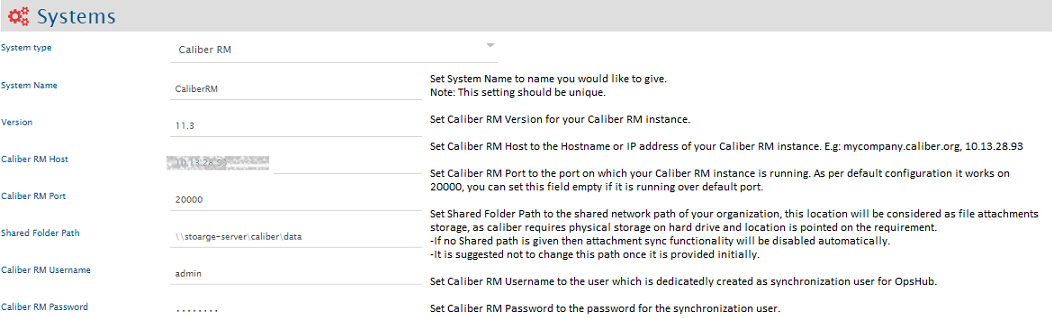
Before you continue to the integration, you must first configure Caliber RM. Click [System Configuration](/integrate/configure-integrations/system-configuration.md) to learn the step-by-step process to configure a system. Refer the screenshot given below for reference.
If the system is deployed on HTTPS and a self-signed certificate is used, then you will have to import the SSL Certificate to be able to access the system from space.vars.OIM. Click [Import SSL Certificates](/getting-started/installation/ssl-certificate-configuration.md) to learn how to import SSL certificate.
## Mapping Configuration
Map the fields between Caliber RM and the other system to be integrated to ensure that the data between both the systems synchronizes correctly.\
Click [Mapping Configuration](/integrate/configure-integrations/mapping-configuration.md) to learn the step-by-step process to configure mapping between the systems.
## Integration Configuration
Set a time to synchronize data between Caliber RM and the other system to be integrated. Also, define parameters and conditions, if any, for integration.\
Click [Integration Configuration](/integrate/configure-integrations/integration-configuration.md) to learn the step-by-step process to configure integration between two systems.
---
# Agent Instructions
This documentation is published with GitBook. GitBook is the documentation platform designed so that both humans and AI agents can read, navigate, and reason over technical content effectively. Learn more at gitbook.com.
## Querying This Documentation
If you need additional information that is not directly available in this page, you can query the documentation dynamically by asking a question.
Perform an HTTP GET request on the current page URL with the `ask` query parameter, and the optional `goal` query parameter:
```
GET https://docs.opshub.com/connectors/caliberrm.md?ask=&goal=
```
`ask` is the immediate question: it should be specific, self-contained, and written in natural language.
`goal` is optional and describes the broader end goal you are ultimately trying to accomplish on behalf of the user. GitBook uses it to tailor the answer towards what is most useful for that goal.
The response will contain a direct answer to the question and relevant excerpts and sources from the documentation.
Use this mechanism when the answer is not explicitly present in the current page, you need clarification or additional context, or you want to retrieve related documentation sections.