> For the complete documentation index, see [llms.txt](https://docs.opshub.com/llms.txt). Markdown versions of documentation pages are available by appending `.md` to page URLs; this page is available as [Markdown](https://docs.opshub.com/upcoming-release/manage/administrator/license-management.md).
# Managing Licenses
## Overview
This section covers how to install new licenses, renew licenses and uninstall licenses.
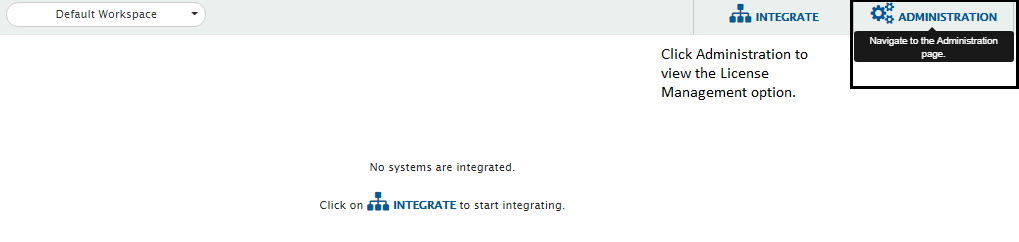
The License Management option will be shown under the Administration drop-down.
The License Management section contains your license details and information such as what kind of license you have, how many days are left for your license to expire, etc.
For detail about how to get a license issued, please refer the section [How to Procure and Renew Licenses](#how-to-procure-and-renew-licenses) in appendix.
## Install License
* Navigate to the Administration section and select **License Management** from the drop-down options.
* Click the **Upload License** link. It will open install license window.
* You can drag & drop the license on **Drop license file here** box or upload the license file using the **Choose File** button.
* License updates will get populated in the form on the right.
* Click **Install License** button to install the license. If you want to reset this change, click the **Reset** button.
After installing, refresh the browser.
**Note** : You can check the status of license and even delete the license from this window.
## View License
* Navigate to the Administration section and select **License Management** from the drop-down options.
* You will see the **Licenses** screen.
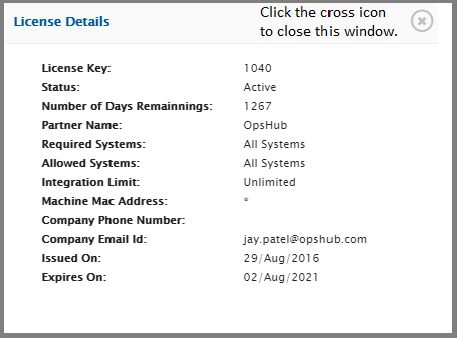
* Click the eye icon against the License name for which you want to view the details.
A pop-up with **License Details** will open.
**Note** See the Version \[Example: QAOIMV6.16-U4B002] and Build \[Example: QA2018Q1PH19\_6\_16\_004\_B002] details in the footer.
## License Expiry Notification
* space.vars.OIM **UI Notifications**
* On space.vars.OIM, upon login, upcoming license expiry warning notifications will be shown for each license starting 60 days till its expiry date. **Note** : No additional configuration is required to enable the same.
* **Mail Notifications**
* To get mail notifications regarding each upcoming license expiry, the SMTP mail server notifications can be configured
* Refer to [Creating SMTP System](/upcoming-release/help-center-index/troubleshooting-index/configure-post-failure-notification.md#smtp-configuration) for creating an SMTP system.
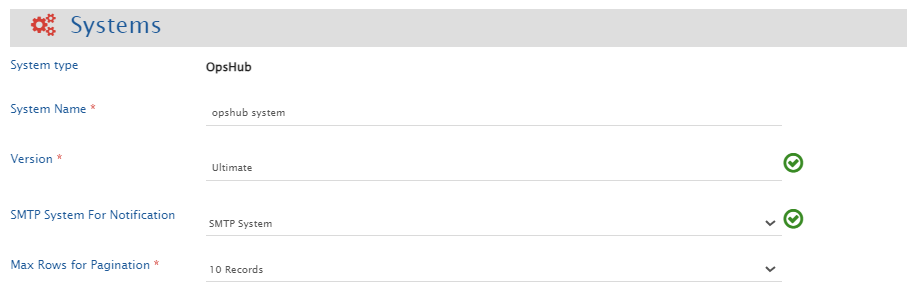
* SMTP Mail Client system must be created in space.vars.OIM and configured in **OpsHub System** under **SMTP System For Notification**.
* Mails will be sent out to the **to** and **cc** configured in SMTP system.
* It will notify the configured SMTP system regarding upcoming expiry at intermittent intervals starting from 60 days before its expiry date. It will send out mail notifications on 60, 45, 30, 15, and from 10 days until 1 day before the expiry of any license.
* If for any reason (such as the SMTP mail server is not connected or SMTP system configuration is not valid or space.vars.OIM is down) license expiry notification doesn't come, it will be logged in space.vars.OIM logs.
## Uninstall License
* Navigate to the Administration section and select **License Management** from the drop-down options.
* You will see the **Licenses** screen.
* Click the cross icon against the License name which you want to delete.
After uninstalling, refresh the browser.
**Note** You will not be able to see the details for a trial license and you will not be able to uninstall it.
### How to Procure and Renew Licenses
For procuring a license, you have to contact our [Sales](mailto:sales@opshub.com) / [Support](mailto:ps@opshub.com) representatives.
* Name
* Email
* Phone
* Organization name
* Country
* MAC Address
If you want to renew your license, send your current license number and your requirement to our sales/support representatives.
space.vars.OIM works best with the following browsers: Google Chrome, Mozilla Firefox, and Safari.
## Known Behaviour
* When multiple valid licenses are installed, feature availability is determined by the latest generated license. This license is treated as the active license for feature validation.
* If a newly installed license does not include features that were available in a previously installed license, those features will no longer be available, even if the older license remains installed and valid.
* Before installing a new license, review the feature differences carefully. A warning message will be displayed if the new license contains fewer features than the currently active license.
---
# Agent Instructions
This documentation is published with GitBook. GitBook is the documentation platform designed so that both humans and AI agents can read, navigate, and reason over technical content effectively. Learn more at gitbook.com.
## Querying This Documentation
If you need additional information that is not directly available in this page, you can query the documentation by asking a question.
Perform an HTTP GET request on the following URL with the `ask` and `goal` query parameters:
```
GET https://docs.opshub.com/upcoming-release/manage/administrator/license-management.md?ask=&goal=
```
`ask` is the immediate question: it should be specific, self-contained, and written in natural language.
`goal` is what the user is ultimately trying to achieve, the reason they need the answer. Sharing it helps GitBook give you a better, more relevant answer. A goal is most helpful when it describes the outcome the user wants rather than restating the question. For example, with `ask=how do I create an API token`, a goal like `automate deployments from our CI pipeline` lets GitBook tailor the answer to that use case.
The response will contain a direct answer to the question and relevant excerpts and sources from the documentation.
Use this mechanism when the answer is not explicitly present in the current page, you need clarification or additional context, or you want to retrieve related documentation sections.