> For the complete documentation index, see [llms.txt](https://docs.opshub.com/llms.txt). Markdown versions of documentation pages are available by appending `.md` to page URLs; this page is available as [Markdown](https://docs.opshub.com/upcoming-release/manage/api/getting-started-with-api.md).
# Getting Started with APIs
## Overview
space.vars.OIM has rich user interface for achieving the integration configurations and using other functionality of space.vars.OIM. However, there can be various cases where the user might need to achieve/use them programmatically, i.e., with the external script, external software program, or with some API client, and space.vars.OIM API is useful in such cases. It is an alternate way to communicate with the space.vars.OIM.
The space.vars.OIM API is organized around REST and uses [JSON](https://www.json.org/json-en.html) format for data exchange.
To have a quick look on the use cases samples and space.vars.OIM API usage examples, please refer to [Use Cases](/upcoming-release/manage/api/sample-use-cases.md).
## Prerequisites
Following are the prerequisites to use space.vars.OIM API:
### Access to space.vars.OIM Instance
* An active instance of space.vars.OIM which needs to be accessible from the machine/[platform](#platforms) for invoking the space.vars.OIM API.
* URL of space.vars.OIM instance. Example: `http://10.13.20.20:8989/OIM/` or `https://10.13.20.20:8443/OIM/`.
* User credentials for accessing the space.vars.OIM instance.
> **Note**: Please refer to [Validate access](#validate-access-to-opshub-integration-manager-instance) for validating this prerequisite.
### API License
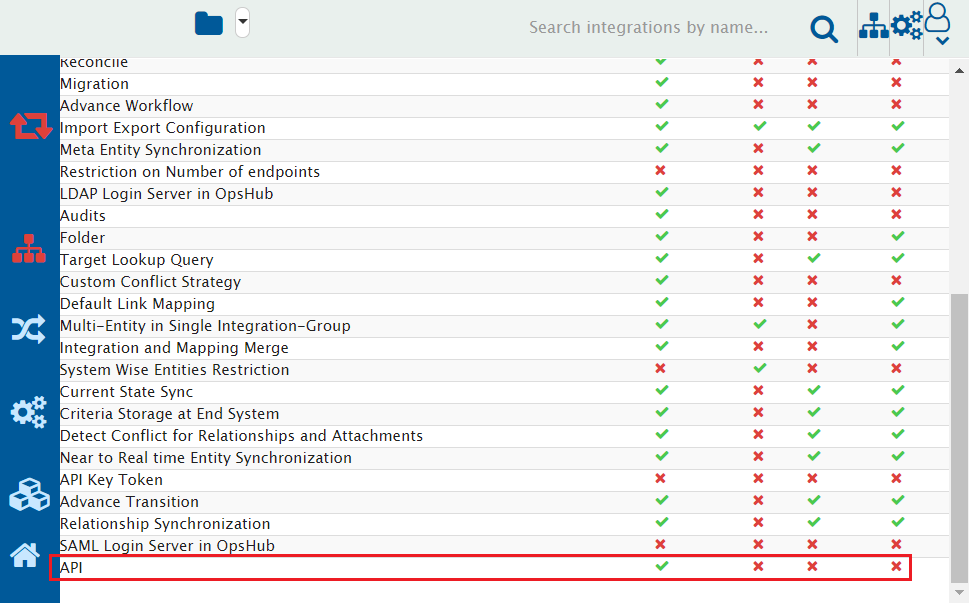
* Usage of space.vars.OIM API requires "API" add-on in the space.vars.OIM license.
> **Note**: Please refer to [Validate API feature](#validate-api-feature) to determine whether the "API" feature is enabled or not on your space.vars.OIM instance.
### Platforms
* space.vars.OIM APIs can be invoked from the platform which can make the REST API Calls.
* API client such as [postman](https://www.postman.com/).
* Programs written in any programing language which has support for HTTP or HTTPS communication.
* Command line tool such as [curl](https://curl.se/).
## Access to API
Access to API will be available for your instance with URL like below:
`://space.vars.OIM `instance>:/OIM/rest/api/docs`
**For example** – If the application url of space.vars.OIM is `http://10.13.20.20:8989/OIM/`, then the Swagger UI will be available at `http://10.13.20.20:8989/OIM/rest/api/docs`.
## Appendix
### Validate API feature
To check whether the "API" feature is enabled in the space.vars.OIM or not, please perform the below steps:
1. [Login](/upcoming-release/getting-started/logging-in.md) to space.vars.OIM with the valid space.vars.OIM user credentials.
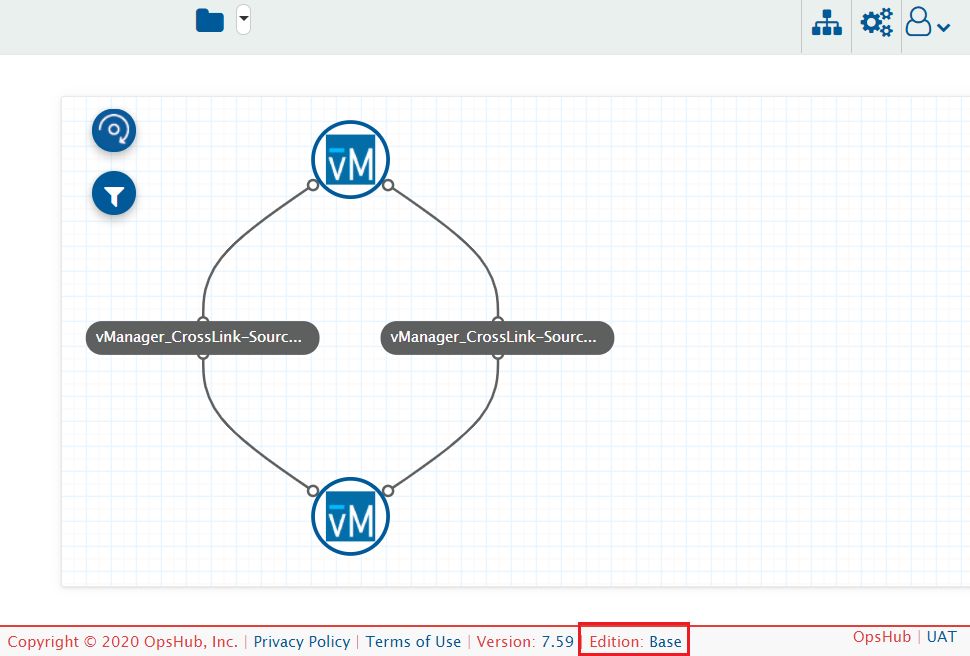
2. Navigate to the Footer and find "Edition" value.
3. Click on the Edition value of the space.vars.OIM
4. Please make sure the "API" feature is enabled.
> **Note**: If this feature is disabled, and you have the license in which this feature is available, then please [install](https://github.com/OpsHubProduct/OpsHub-Documentation/tree/DevSpace/docs/manage/api/Managing_Licenses/README.md) the correct license. If you don’t have a valid license, please reach out to OpsHub Sales/Support team for receiving the appropriate license.
### Validate access to space.vars.OIM instance
To check whether the space.vars.OIM instance is accessible or not, please perform the below steps:
1. Open space.vars.OIM instance URL from any browser from the machine/platform where space.vars.OIM APIs are invoked.
2. Access the space.vars.OIM instance from browser using the credentials you want to use for space.vars.OIM API communication.
3. If you can successfully login, this prerequisite is met.
> **Note**: If space.vars.OIM is configured on HTTPS, then SSL certificates needs to be imported based on the chosen platform:
* For the API clients like [postman](https://www.postman.com/), there are some [steps](https://learning.postman.com/docs/sending-requests/certificates/) to configure it.
* For the [curl](https://curl.se/) command, this can be [configured using -cert](https://curl.se/docs/manpage.html) option.
* For the programs, the steps will differ based on the expectation of the programming languages in which it was written.
## Known Limitations
1. SAML Users won't be able to login through the API.
* Let's say the user has configured SAML login for OIM UI Login. Such users won't be able to login through the API. It would need either Default or LDAP user.
---
# Agent Instructions
This documentation is published with GitBook. GitBook is the documentation platform designed so that both humans and AI agents can read, navigate, and reason over technical content effectively. Learn more at gitbook.com.
## Querying This Documentation
If you need additional information that is not directly available in this page, you can query the documentation by asking a question.
Perform an HTTP GET request on the following URL with the `ask` and `goal` query parameters:
```
GET https://docs.opshub.com/upcoming-release/manage/api/getting-started-with-api.md?ask=&goal=
```
`ask` is the immediate question: it should be specific, self-contained, and written in natural language.
`goal` is what the user is ultimately trying to achieve, the reason they need the answer. Sharing it helps GitBook give you a better, more relevant answer. A goal is most helpful when it describes the outcome the user wants rather than restating the question. For example, with `ask=how do I create an API token`, a goal like `automate deployments from our CI pipeline` lets GitBook tailor the answer to that use case.
The response will contain a direct answer to the question and relevant excerpts and sources from the documentation.
Use this mechanism when the answer is not explicitly present in the current page, you need clarification or additional context, or you want to retrieve related documentation sections.