# OAuth Token Generation
* space.vars.SITENAME supports OAuth-based authentication for IBM Engineering Requirements Management DOORS Next system. space.vars.SITENAME requires the OAuth token and OAuth token secret.
* [Option 1](#generate-token-using-doorsng-token-generator-utility): Use a stand-alone utility bundled with space.vars.SITENAME to generate the OAuth token.
* [Option 2](#generate-token-using-rest-client-postman): Generate an OAuth token using a third-party rest client such as postman.
***
## Generate Token Using DoorsNG Token Generator Utility
* This stand-alone utility automates the OAuth token generation and eases the system configuration in space.vars.SITENAME for IBM DOORS Next system, supporting OAuth-based authentication.
* This utility helps to generate OAuth token and allows the user to push back the generated token back to space.vars.SITENAME given the push back to space.vars.SITENAME server option is selected.
* If push back to space.vars.SITENAME option is selected and the given IBM DOORS Next system name does not exist in space.vars.SITENAME, then the utility will create the new system in space.vars.SITENAME with a given name along with generated token details.
* If push back to space.vars.SITENAME option selected and the given IBM DOORS Next system name does exist in space.vars.SITENAME, then the utility will update the authentication parameter(s) such as consumer key, consumer secret, OAuth token, and OAuth secret against found system in space.vars.SITENAME.
* This utility can be executed from any machine that has access to the IBM DOORS Next endpoint and space.vars.SITENAME.
* It is required to install python version >=3.7.0 to run this utility.
* Extract the **DoorsNG\_Oauth\_Token\_Generator.zip** located at `space.vars.SITENAME>/Other_Resources/Resources`.
* Execute the command **py token\_generator.py** from the command line.
* If IBM DOORS Next endpoint is configured with secured connection (HTTPS), then import the SSL certificate to the location `/DoorsNG_Oauth_Token_Generator/certificate/doorsnext`.\*
* If space.vars.SITENAME is configured with secured connection (HTTPS) and push back OAuth token option is selected, then import the SSL certificate to the location `/DoorsNG_Oauth_Token_Generator/certificate/opshub`.
* Refer README.txt file present inside the extracted zip folder to learn more details about this utility.
***
## Generate Token Using Rest Client (Postman)
* OAuth token generation is 3 steps once consumer key and consumer secret generated in end system.
### Get the OAuth Request Token
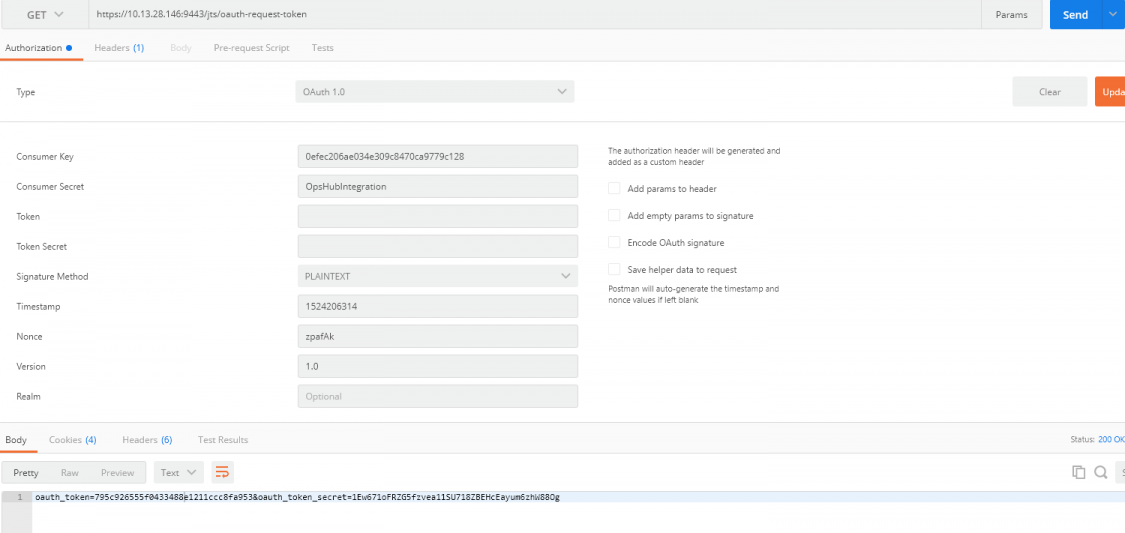
* Get the OAuth Request Token using the generated **Customer Key** and **Customer Secret** as per the step Generate Consumer Key.
* Open PostMan or Rest client for sending the request for OAuth Token.
* Set the Get Method, set the URL as `/jts/oauth-request-token`, set the Authentication Type as OAuth 1.0.
* Set **Consumer Key** and **Consumer Secret** in the request.
* Click *Send*. In the response, OAuth token and OAuth token secret will be generated.
***
### Authorize OAuth Request Token: Authorize OAuth Token generated in above step.
* To authorize OAuth Request Token, prepare the request mentioned below and open in the browser. It requires the login with a user who has admin privileges.
* Authorize URL:: `/jts/oauth-authorize?oauth_token=&oauth_consumer_key=`
* For example: `https://10.13.28.146:9443/jts/oauth-authorize?oauth_token=795c926555f0433488e1211ccc8fa953&oauth_consumer_key=0efec206ae034e309c8470ca9779c128`
***
### Get final access token
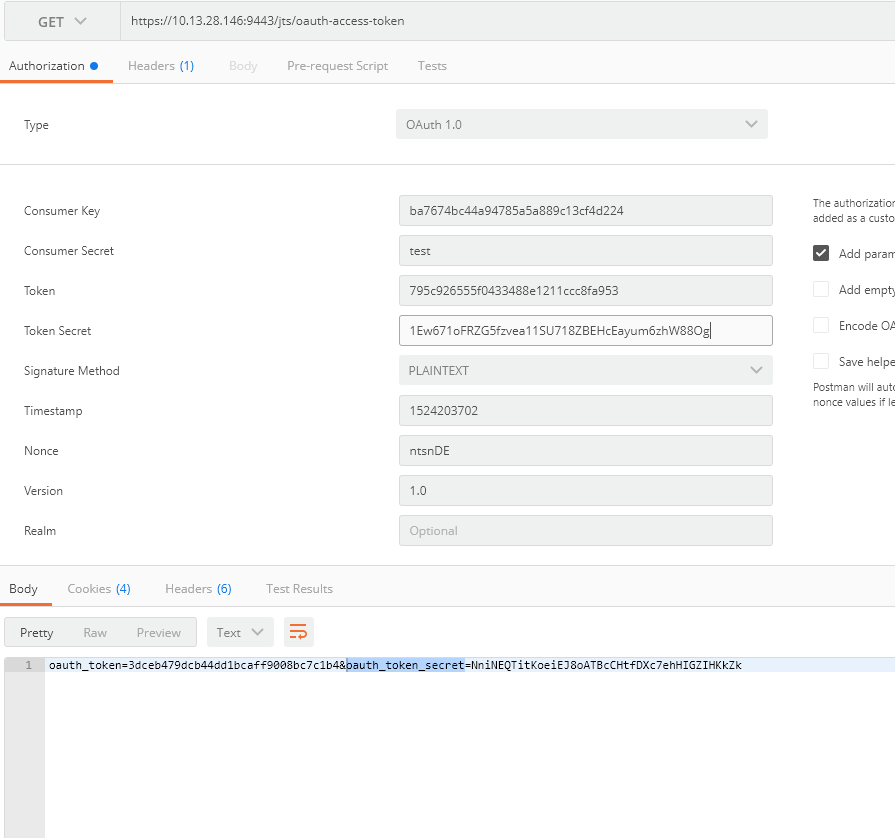
* After authorizing the OAuth Token, send a request to get the final access token.
* Open PostMan or Rest client for sending the request for OAuth Token.
* Set the Get Method, set the URL as `/jts/oauth-access-token`, set the Authentication Type as **OAuth 1.0**. Set the required field for OAuth 1.0 like Customer Key, Customer Key Secret, and provide the OAuth token and OAuth token secret that was generated in step 3.
* Click **Send** to get final OAuth access token, OAuth token secret for OAuth Authentication.