# vPlan is not loaded as projects in Integration Configuration
### Description
The user has configured the Verisium Manager System in the space.vars.SITENAME. However, vPlans are not loaded in the Project list of Integration Configuration / Mapping configuration.
### Cause
Integration is supported with the vPlan in the database only. Hence, vPlans will be loaded in the Project list of Integration Configuration / Mapping configuration only if there exist a vPlan in the database.
### Solution
* Create a vPlan in database to use it as a Project in the Integration Configuration / Mapping configuration.
* To create the vPlan in the database of the Verisium Manager, user needs to enable the **"vPlan in database"** option of the Verisium Manager, i.e. :
* Open **"Verisium Manager Desktop Client"**, i.e., Launch Verisium Manager desktop client by using `vmanager` command in the Command Prompt of the machine where **Verisium Manager client** is configured.
* Provide credentials, if client asks for the UserName and Password.
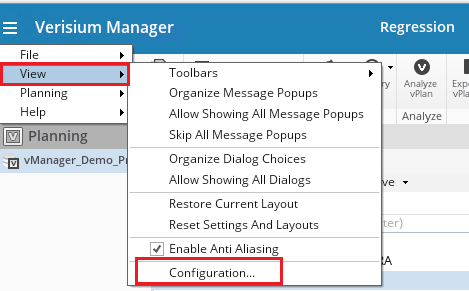
* Select **"View"** → **"Configurations"**
* Select **"VPlan"**
* Enable **"vPlan in Database"**\

> **Note**: To enable this option, **"Vmanager\_High\_Availability"** feature \[Product Id: VMGH01. Product Name: vManager Gen 4] must be present in the Verisium Manager license.
* After this configuration, vPlan can be created in the database. Please follow the steps given below for the same:
1. Select **"New vPlan"** button.
2. This will open a **"New vPlan"** window.
3. Please enter the preferred name in the **"vPlan name"** textbox.
4. Select **"OK"** button.\