# Integration Sync Report
## Overview
Integration Sync Report provides the information for each entity synchronized by space.vars.SITENAME. The report gives insight into which entity from which project in the source system has synchronized to which project in the target system. The report also shows source entities ids and target entities ids. You can also navigate to the failed event of a particular entity from this report. Each integration has a separate Integration Sync Report.
## How to navigate to the Integration Sync Reports
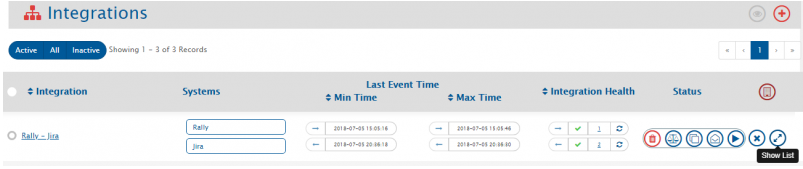
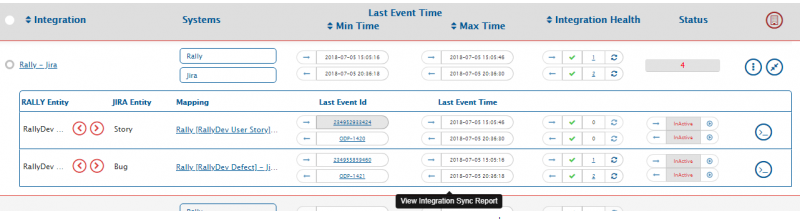
To view the report for any integration, go to an integration, click the **Show List** button. From the list, click **Last Event ID** or **Last Event Time** button.
## Reading an Integration Sync Report
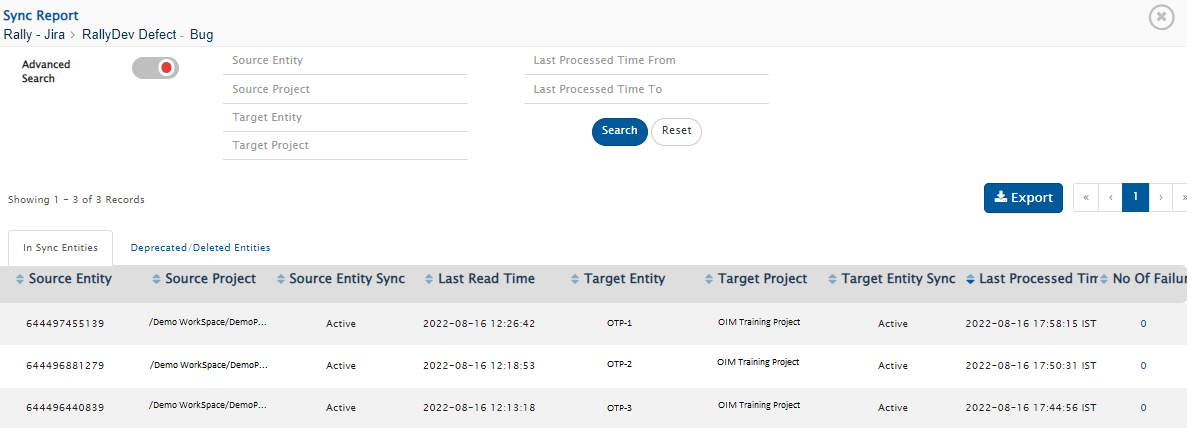
The integration sync report is divided into two panes:
1. **In Sync Entities** : Report of the entities which are synchronized under the create/update events
2. **Deprecated/Deleted Entities** : Report of the entities which are synchronized under the Delete events.
The Integration Sync Report includes:
* **Source Entity Id:** This column shows the entity id of the source system
* **Source Project Name:** This column shows the name of the project from which entity gets polled by space.vars.SITENAME
* **Source Entity Sync State:** This column shows the [state](#state) of the entity in the source system
* **Last Updated in Source:** This column shows the last updated time for the given entity in the source system
* **Target Entity Id:** This column shows the entity id of the target system in which entity gets created by space.vars.SITENAME
* **Target Project Name:** This column shows the project name of the target system in which entity gets created by space.vars.SITENAME
* **Target Entity Sync State:** This column shows the [state](#state) of the entity in the target system
* **Last Processed Time:** This column show the time when entity was last processed by space.vars.SITENAME
* **No. of Failures:** This column shows the number of failed events for a given entity. By clicking on the number, you will be navigated to failed events for that entity.
## Filtering an Integration Sync Report
You can filter data from an Integration Sync Report by using the following parameters:
* **Source Entity Id:** Search the entity by providing Source Entity Id
* **Source Project Name:** Search the records with the source project name specified in the field
* **Target Project Name:** Search the records with the target project as specified in the field
* **Last Processed Time:** Search the entities with the Last Processed time between the range specified in the **Last Processed Time From** and **Last Processes Time To** fields
* **Target Entity Id:** Search the entity by providing the Target Entity Id
* **Source Entity Sync State:** Search the records with the source entity sync [state](#state) specified in the field
* **Target Entity Sync State:** Search the records with the target entity sync [state](#state) specified in the field
Enter the details in the field that you want to use for filtering the data. Then, click the **Search** button.
## Some Key Points to Note
* Project column remains empty for the system that doesn't have the concept of projects. If the system has the concept of projects and the project column is empty, it means the entity has not yet synchronized to the target system.
* In case of migration or up-gradation the value of the column **Last Processed Time** for already synced entity is the time at which migration runs and **Project** remains empty.
* In case of integration, if any entity has failure(s) on **Create event**, then **Last Updated in `` System, `` Entity Id and `` Project** columns remain empty for that record.
## Glossary
### State
* It represents the status of the existence of the entity in reference to the configured integration in space.vars.SITENAME
* It typically has below possible values:
1. **Active:** Entity is accessible in the end system
2. **Not Accessible:** Entity is not accessible in the end system
3. **Deleted By Sync:** Entity is Logically deleted/Soft deleted by space.vars.SITENAME in the end system as per details given on [Source Delete Synchronization](https://docs.opshub.com/v7.215/integrate/advanced-sync-scenario/source-delete-synchronization) page.