# Inline Image or File Synchronization

## Overview

<code class="expression">space.vars.SITENAME</code> supports the synchronization of images and files across end systems in fields, comments, and as attachments on the entity.

* There are certain types of end systems based on how they add images/ files on their entity fields and comments.

1. **Entity Storage:**
   * Upon adding an image/ file to rich text fields, the same image/ file is also added as an attachment to the entity.
   * Example: If image/ file is added to rich text field in Rally, the same image/ file will be visible in attachment section of the entity.
   * Entity Storage Systems: Rally, Jira, OpenText ALM Quality Center (Formerly Micro Focus ALM/QC), qTest, DOORS NG, ServiceNow, Codebeamer, Windchill, TestRail, OpenText ALM Octane, Enterprise Architect, Aha!, Redmine
2. **Server Storage:**
   * Upon adding an image/ file to rich text fields, they are uploaded to an end system location itself, but the image/ file will not be added as an attachment to the entity.
   * Example: If image/ file is added to rich text field in Azure DevOps, this image/ file will not be visible in attachment section of entity. Instead, it will be uploaded to an end system.
   * Server Storage Systems: Version one, Jama, Aras, Readyone, Salesforce, ETM, DOORS, Hubs=Spot, Azure DevOps
3. **Base64 Storage:**
   * Upon adding an image/ file to rich text fields, they are not uploaded anywhere. The raw data itself is encoded in Base64 and is set in the rich text field. Image/ file will not be added as an attachment on the entity.
   * Example: If image/ file is added to rich text field in Broadcom Clarity, image/ file will not be uploaded anywhere. Also, it will not be added as attachment on the entity.
   * Base64 Storage Systems: Broadcom Clarity

## Image/ File Synchronization Behavior with Storage Combinations

### Server/ Base64 Storage System Combinations

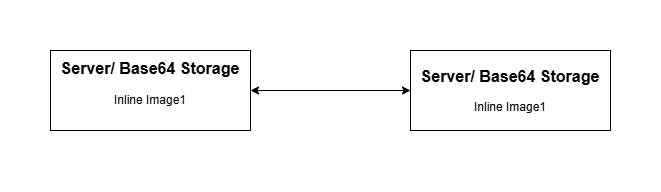
<div align="center"><img src="https://818964384-files.gitbook.io/~/files/v0/b/gitbook-x-prod.appspot.com/o/spaces%2FK5eA7qMDBFu0HHHMDehi%2Fuploads%2Fgit-blob-857d43606828fe2a32f59b1211d5f665aae808a5%2FServer_to_server_inline.png?alt=media" alt="" width="800"></div>

* Between server/ base64 and server/ base64 storage combination systems, if an inline image/ file is added to the entity upon synchronization by <code class="expression">space.vars.SITENAME</code> as shown in the above image, it will be similar to the way image/ file is added to the source end system entity, i.e., it will only be added on inline field/ comment.

### Entity Storage System Combinations
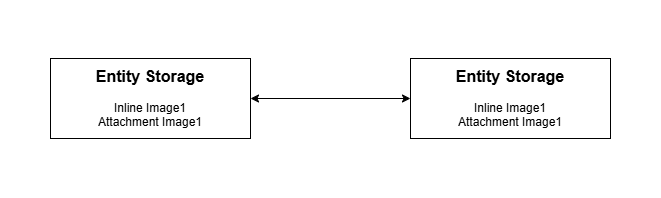
<div align="center"><img src="https://818964384-files.gitbook.io/~/files/v0/b/gitbook-x-prod.appspot.com/o/spaces%2FK5eA7qMDBFu0HHHMDehi%2Fuploads%2Fgit-blob-0413cc352f48273b62f3e334af0d8b46ead3cdee%2FEntity_to_entity_inline.png?alt=media" alt="" width="800"></div>

* Between entity and entity storage combination systems, if an inline image/ file is added to the entity, upon synchronization by <code class="expression">space.vars.SITENAME</code> as shown in the above image, it will be similar to the way image/ file is added to the source end system entity, i.e., it will be added on inline field/ comment and also as an attachment on the entity.
  * Due to the entity storage system's behavior of auto-adding the image/ file as an attachment to the entity regardless of whether attachment synchronization is enabled/ disabled in mapping. <code class="expression">space.vars.SITENAME</code> will also add the attachment on the entity to synchronize the image/ file.

### Server/ Base64 Storage and Entity System Combinations

![](https://818964384-files.gitbook.io/~/files/v0/b/gitbook-x-prod.appspot.com/o/spaces%2FK5eA7qMDBFu0HHHMDehi%2Fuploads%2Fgit-blob-b149522282dc71c0270744139ae01844706fb397%2FServer_to_entity_inline.png?alt=media)

* Between server/ base64 and entity storage combination systems, if an inline image/ file is added to the entity, upon synchronization by <code class="expression">space.vars.SITENAME</code> above shown image will be the way image/ file will be added to the entity.
  * When the entity storage system is the target, <code class="expression">space.vars.SITENAME</code> will auto-add the image/ file as an attachment to the entity.
  * When server/ base64 storage system is the target, <code class="expression">space.vars.SITENAME</code> will not auto-add the image/ file as an attachment to an entity. It will only be added in the rich text field/ comment.
  * View parity between these storage combinations will be due to end-system behavior differences.

## Image/ File Synchronization Behavior with Text Fields/ Comments

* In the case of a Text type field/ comment, we cannot add renderable images/ files.
  * Hence, we will add a custom tag with the uploaded image/ file URL and the filename of the uploaded image/ file.

```xml
<InlineFile src="https:://opshub.jamacloud.com/attachment/1193337/img1.png">img1.png</InlineFile>
```

* In case of backward synchronization of such fields:
  * The original uploaded image to the original source will be preserved. i.e., in backward synchronization, we will ensure that the renderable source image is not removed.
    * For Base64 end systems, since a custom tag was not added in backward sync, the original image added to the source entity will be removed.

> **Note:** If the target end system is Base64 storage and the mapped field is text type, then bidirectional mapping with a rich text field is not advisable due to the removal of the image at the source field

## Image/ File Synchronization Behavior with Target end system not supporting Inline Synchronization

* In case the target end system does not support inline synchronization, and an inline image/ file is added to the source entity rich text field/ comment, then upon synchronization by <code class="expression">space.vars.SITENAME</code>, below mentioned will be the behavior:
  * Data synchronized to the target entity will not have any renderable images/ files or opshub custom tags for image/ file when it is not a renderable field/ comment.
  * Images/ files will be uploaded to the entity as attachments.
  * In backward synchronization, from such end systems, the originally added images/ files will be removed from the fields.

## Image/ File Synchronization Behavior with Comment

* If a comment has been synchronized by <code class="expression">space.vars.SITENAME</code> with an inline image/ file, the target comment will also have the image/ file.
  * Now, even if the comment is deleted in the source end system, the image/ file will persist in the target comment and also as an attachment on the entity in case it is an entity storage end system.

## Synchronization Behavior

Following are the **Before** and **After** behaviors for the given scenarios:

| **Serial No.** | **Scenario**                                                                                                                                                                                                                    | **Source Applicable To** | **Target Applicable To** | **Behavior before 7.195**                                                                                                                                                                                                                                   | **Behavior after 7.195**                                                                                                                                                                                                                                                                                  |
| -------------- | ------------------------------------------------------------------------------------------------------------------------------------------------------------------------------------------------------------------------------- | ------------------------ | ------------------------ | ----------------------------------------------------------------------------------------------------------------------------------------------------------------------------------------------------------------------------------------------------------- | --------------------------------------------------------------------------------------------------------------------------------------------------------------------------------------------------------------------------------------------------------------------------------------------------------- |
| 1              | <p>- Create entity with no attachment or inline images<br>- Add inline image to entity & start synchronization</p>                                                                                                              | Entity Storage           | Server Storage           | <p>- An image will be uploaded twice, one as attachment & second as inline image<br>- Due to re-upload of image, one image of source will be in sync with multiple target images</p>                                                                        | - An image will be uploaded on server & will be referred in rich text field                                                                                                                                                                                                                               |
| 1 (contd.)     |                                                                                                                                                                                                                                 | Entity Storage           | Entity Storage           | - An image will be added to entity as attachment & will be referred in rich text field                                                                                                                                                                      | Same                                                                                                                                                                                                                                                                                                      |
| 2              | <p>- Create entity with no attachment or inline image<br>- Add comment with inline image & start synchronization</p>                                                                                                            | Entity Storage           | Server Storage           | <p>- First, image will be added as attachment<br>- When the image is detected as inline image, the same will be removed from the attachment<br>- A new image will be uploaded as the inline image. It will be referred from rich text field or comment.</p> | Same                                                                                                                                                                                                                                                                                                      |
| 3              | <p>- Create entity with one attachment<br>- Add the same file in rich text field</p>                                                                                                                                            | ALL                      | ALL                      | Same                                                                                                                                                                                                                                                        | Same                                                                                                                                                                                                                                                                                                      |
| 4              | <p>- If the rich text field was not mapped previously and it had inline images<br>- After few revisions, rich text field is mapped</p>                                                                                          | ALL                      | ALL                      | - No image was added in target, OH\_IMG tag was added with a unique code                                                                                                                                                                                    | - Field will have inline images in target                                                                                                                                                                                                                                                                 |
| 5              | <p>- Create entity with multiple same name images referred in single rich text field & synchronize to target<br>- Update target entity & start other way synchronization</p>                                                    | ALL                      | ALL                      | - All same named images will be mapped to one source image                                                                                                                                                                                                  | - Despite matching file names, a one-to-one mapping between source and target images will be preserved                                                                                                                                                                                                    |
| 6              | <p>- Create entity with same image referred in two or more rich text fields<br>- Update the content of image<br>- In later revision, both rich text field has some text appended</p>                                            | ALL                      | ALL                      | <p>- Inline image will be updated twice<br>- Due to re-upload, one image of source will be in sync with multiple target images</p>                                                                                                                          | - Inline image will be updated only once                                                                                                                                                                                                                                                                  |
| 7              | <p>- HTML type of field is mapped with text field in target<br>- Source field has an inline image</p>                                                                                                                           | ALL                      | Server Storage           | <p>- Two images will be uploaded, one as external image in target system and other as attachment on entity<br>- In target text field, it will be shown as <code>\<ImageTag>Img1.png\</ImageTag></code></p>                                                  | <p>- One image will be uploaded in the target system and this will not be visible in attachment section of entity<br>- In target text field, it will be shown as <code>\<ImageTag src=”Server storage uploaded URL”>Img1.png\</ImageTag></code></p>                                                       |
| 7 (contd.)     |                                                                                                                                                                                                                                 | ALL                      | Entity Storage           | <p>- Attachment will be uploaded twice<br>- In target text field, it will be shown as <code>\<ImageTag>Img1.png\</ImageTag></code></p>                                                                                                                      | <p>- Attachment will be visible in attachment section of entity.<br>- In target text field, it will be shown as <code>\<ImageTag src=”Attachment URL”>Img1.png\</ImageTag></code></p>                                                                                                                     |
| 7 (contd.)     |                                                                                                                                                                                                                                 | ALL                      | Base64 Storage           | - Inline image with base64 storage is not supported                                                                                                                                                                                                         | <p>- Target text field will have <code>\<ImageTag>Img1.png\</ImageTag></code><br>- Image will not be uploaded to attachment or anywhere. Instead, an image tag with filename will be created</p>                                                                                                          |
| 8              | <p>- Same source field is mapped to two different fields in target & one of them is a text field and other one is a rich text field<br>- Source field has inline image</p>                                                      | ALL                      | Server Storage           | <p>- Image will be synchronized both as inline image for rich text field and as attachment to the target entity<br>- Rich text field has inline image<br>- Text field has <code>\<ImageTag>Img1.png\</ImageTag></code><br>- Entity has attachment</p>       | <p>- Rich text field will have inline image<br>- Text field will have <code>\<ImageTag src = ”Server storage uploaded URL”>Img1.png\</ImageTag></code><br>- Image will be uploaded to external server and will be referred in these 2 fields</p>                                                          |
| 8 (contd.)     |                                                                                                                                                                                                                                 | ALL                      | Entity Storage           | <p>- Rich text field will have inline image<br>- Text field will have <code>\<ImageTag src= ”Attachment URL”>Img1.png\</ImageTag></code><br>- The entity will have only the attachment due to the implicit behaviour of Entity Storage Connector</p>        | Same                                                                                                                                                                                                                                                                                                      |
| 9              | <p>- Create entity with no attachment or inline image<br>- Add comment with inline image & start synchronization<br>- Target end system does not support inline image in comments</p>                                           | ALL                      | Server Storage           | <p>- Same image will be uploaded twice to the end system<br>- Attachment will be added to the entity also</p>                                                                                                                                               | <p>- First, image will be added as attachment<br>- When the image is detected as inline image, the same will be removed from attachment & image will be uploaded to server again<br>- The comment will be added with <code>\<ImageTag src = ”Server storage uploaded URL”>Img1.png\</ImageTag></code></p> |
| 9 (contd.)     |                                                                                                                                                                                                                                 | ALL                      | Entity Storage           | <p>- First, image will be added as attachment to entity<br>- When the image is detected as inline image, a comment will be added with <code>\<ImageTag src = ”Attachment URL”>Img1.png\</ImageTag></code></p>                                               | Same                                                                                                                                                                                                                                                                                                      |
| 10             | <p>- Comment synchronization is enabled<br>- Rich text field is mapped to text field in target<br>- Both have same inline image</p>                                                                                             | Entity Storage           | Server Storage           | <p>- Image will be uploaded to server system & text field data added with <code>\<ImageTag src = ”Server storage uploaded URL”>Img1.png\</ImageTag></code><br>- Comment will be added with referred inline image</p>                                        | Same as before                                                                                                                                                                                                                                                                                            |
| 11             | <p>- Source HTML field is mapped to target text field<br>- Create entity with inline image & synchronize<br>- Update target text field & start reverse synchronization (from target to source)</p>                              | ALL                      | Base64 Storage           | - Inline image with base64 storage is not supported                                                                                                                                                                                                         | <p>- If same name image is found in source entity, it will be replaced with source URI<br>- In case, image with same name is not found, the image will be removed from the source entity</p>                                                                                                              |
| 12             | <p>- Create entity with rich text field having image 1<br>- In next revision, image 2 is uploaded on the same field<br>- If the events fail and are in retry but image 1’s base64 data is missing from the write-side cache</p> | Base64 Storage           | ALL                      | - Inline image with base64 storage is not supported                                                                                                                                                                                                         | <p>- Base64 content for image 1's hashcode will be queried in source entity<br>- Since, it is no longer present on entity now, image 1 will not be synchronized<br>- In the next revision, image 2 will be synchronized</p>                                                                               |
