# User Role Association
## Overview
* space.vars.SITENAME allows to associate roles with users defining what actions a user can perform.
* One user can have multiple Integration and Administration Roles. The permissions available to that role will be a union of permissions associated with all individual roles.
* Only users with permission **Permission Grant** can associate roles with users.
* Roles can be associated with user from **View associated roles** button in rightmost column against a given user.
## Associating Administration Role to a User
* Navigate to user role association screen and click on edit icon in top right corner.
* Select roles to be associated with given user. Refer to [Permissions and Corresponding Actions](https://docs.opshub.com/v7.215/manage/administrator/role-configuration#permissions-and-corresponding-actions) section to understand which operations can be performed based on the configured role.
* Under the drop down list, only Administration roles will be available.
* For instance, if Sync Administrator role is to be associated with user 'David Smith', it can be selected under Administration as shown below:
* Click on **Save** button to save user role association.
## Associating Integration Role to a User
* Navigate to User Role Association screen and click on edit icon in top right corner as shown below:
* Select roles to be associated with the given user. Refer to [Permissions and Corresponding Actions](https://docs.opshub.com/v7.215/manage/administrator/role-configuration#permissions-and-corresponding-actions) section to understand which operations can be performed based on the configured role.
* Under the drop down list, only Integration roles will be available.
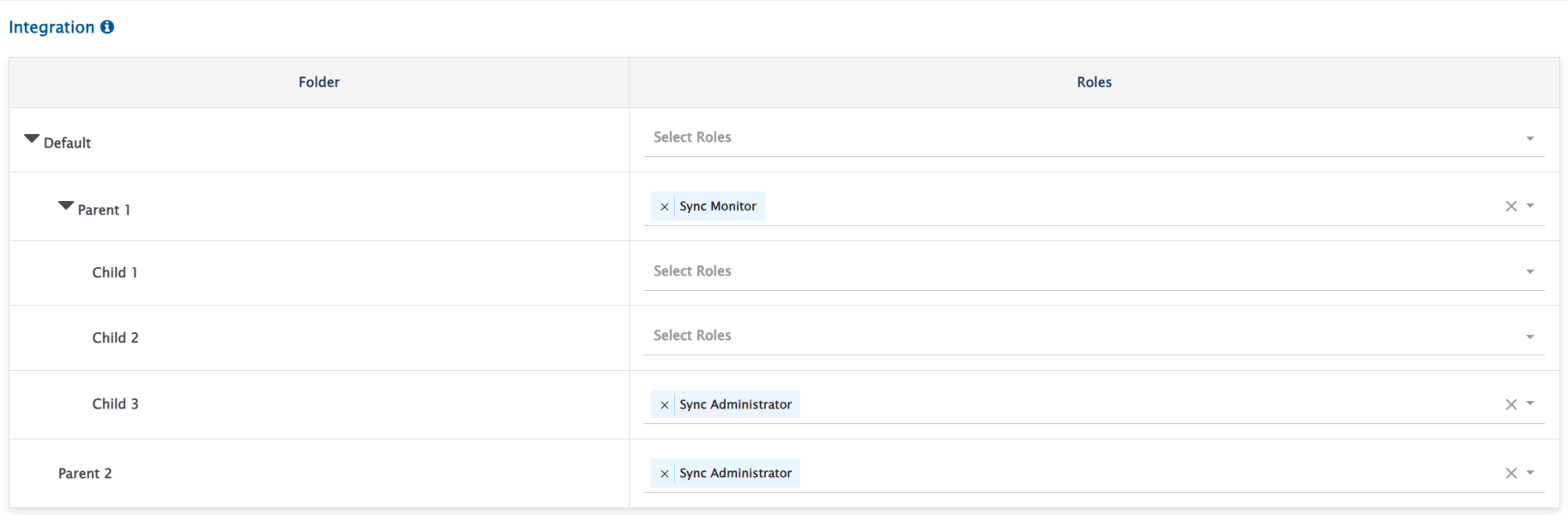
* Here, roles can be assigned folder-wise.
* Permissions' Inheritance in Child Hierarchy:
* Roles associated with given folder would be inherited in entire child hierarchy of that folder.
* Associating roles in the child folder will override roles of parent folder.
* Assigning any role in a given folder indicates that user will have **Read** access to all integration resources in that folder and its child hierarchy as well.
* Assigning any role with **Read** access to integration or mapping in a child folder indicates **Read** access to all associated mappings and systems in the parent folder.
* For above configuration, the user will be able to perform the following operations:
| **Folder** | **Actions supported** |
| ------------------------ | ------------------------------------------------------- |
| Default/Parent 1 | All actions associated with **Sync Monitor** role |
| Default/Parent 1/Child 1 | All actions associated with **Sync Monitor** role |
| Default/Parent 1/Child 2 | All actions associated with **Sync Monitor** role |
| Default/Parent 1/Child 3 | All actions associated with **Sync Administrator** role |
| Default/Parent 2 | All actions associated with **Sync Administrator** role |