# Pre Migration Checklists
> 👉 **Looking for older version steps?**\
> Refer to the [Pre-Migration Checklist](https://docs.myopshub.com/oim/index.php/Pre-Migration_Checklist). for `space.vars.SITENAME` versions prior to **7.121**.
## Migrating space.vars.SITENAME version to 7.121 or above
### Upgradation of MySQL Server
**Applicable When:** space.vars.SITENAME is installed with MySQL database.
**Reason:** From version 7.121 onward, the special characters having 4 byte UTF8 encoding can be stored in space.vars.SITENAME database.
**Actions:** Upgrade MySQL database to 5.7.18 or above versions.
***
## Migrating space.vars.SITENAME version to 7.134 or above
**Applicable When:** If space.vars.SITENAME is installed with MSSQL database and the base installation version of space.vars.SITENAME is 6.03 or an earlier version.
**Actions:**
* Execute the following queries to remove the default value constraint for column `Is_marked_deleted` of table `OHMT_EAI_entity_info` in MSSQL:
```
SELECT col.name AS ColumnName, def.name AS ConstraintName
FROM sys.default_constraints def
INNER JOIN sys.columns col
ON def.parent_object_id = col.object_id
AND def.parent_column_id = col.column_id
WHERE parent_object_id = OBJECT_ID(N'DATABASE_NAME.TABLE_NAME');
```
* The above query's output will be the constraint's name to be dropped. Example: `'DF__OHMT_EAI___Is_ma__63E3BB6D'`. Please put the constraint name fetched above in the query below to drop the constraint.
```
ALTER TABLE DATABASE_NAME.TABLE_NAME DROP CONSTRAINT CONSTRAINT_NAME_FOUND_FROM_ABOVE_QUERY_FOR_COLUMN_IS_MARKED_DELETED;
```
**Reason:** In the 6.03 version, the default value was added to the `Is_marked_deleted` column of `OHMT_EAI_entity_info`. Because of this, MSSQL implicitly added a default constraint on this table. In the 7.134 version, the column `Is_marked_deleted` was dropped as a part of one feature of space.vars.SITENAME.
***
## Migrating space.vars.SITENAME version to 7.139 or above
**Applicable When:** If the initial installation version of space.vars.SITENAME is 6.11 Update 2 HF4 or earlier, the actions mentioned must be performed.
**Reason:** In the `reportsdb` database's `ReportsDBVersion` table, `6.11.02.00.00` entry was wrongly added to the `version` column.
**Actions:**
```sql
DELETE FROM reportsdb.ReportsDBVersion WHERE version='6.11.02.00.00';
```
***
## Migrating space.vars.SITENAME version to 7.145 or above
### Upgradation of MS SQL Server to enabled support for TLS 1.2 or above
**Applicable When:** space.vars.SITENAME is installed with MSSQL database and that MSSQL version does not support TLS v1.2 or above.
**Reason:** From version 7.145 onward, TLSv1.0 and TLSv1.1 protocols are not supported by space.vars.SITENAME.
**Actions:** An upgrade to MS SQL version will be needed, which supports TLSv1.2 or above. Refer to [this Microsoft link](https://support.microsoft.com/en-us/topic/kb3135244-tls-1-2-support-for-microsoft-sql-server-e4472ef8-90a9-13c1-e4d8-44aad198cdbe) for upgrading MS SQL version.
***
## Migrating space.vars.SITENAME version to 7.149 or above
### Link changes in space.vars.SITENAME for Jira Cloud
**Applicable When:**
* Jira Cloud is configured as one of the end points in the integration and the Epic link/Parent link/Issues in Epic/Child issues are configured in the space.vars.SITENAME mapping.
**Actions:**
* If the user has mapped both the Epic and the Parent links in the space.vars.SITENAME's relationship mapping:
* The user needs to remove one of them from the mapping. For example, they can remove Epic link/Parent link. Both these links must not be mapped.
* If the user has mapped both Child issues and Issues in the Epic link in the space.vars.SITENAME's relationship mapping:
* The user needs to remove one of them from the mapping. For example, they can remove Child issues/Issues in Epic. Both these links must not be mapped.
**Reason:**
* In Jira Cloud, the Epic link and the Parent link are merged to Parent link and Child issues & Issues in Epic are merged to the Child link. To adopt the Jira cloud behavior changes, the link changes are executed in the space.vars.SITENAME.
***
## Migrating space.vars.SITENAME version to 7.151 or above
### Link changes in space.vars.SITENAME for Codebeamer
**Applicable When:**
* Codebeamer/Codebeamer X is configured as one of the end points in the integration and the Parent/Hierarchy Parent/Child/Hierarchy Child links are configured in the space.vars.SITENAME mapping.
**Actions:**
* If the user has mapped both Parent and Hierarchy Parent links in the space.vars.SITENAME's relationship mapping:
* The user needs to remove one of them from the mapping. For example, Parent/Hierarchy Parent link can be removed. Both these links must not be mapped.
* If the user has mapped both Child and Hierarchy Child links in the space.vars.SITENAME's relationship mapping:
* The user needs to remove one of them from the mapping. For example, Child/Hierarchy Child link can be removed. Both these links must not be mapped.
**Reason:**
* In Codebeamer/Codebeamer X, links synchronization and hierarchy synchronization are processed via Hierarchy Parent and Hierarchy Child Links.
***
***
## Migrating space.vars.SITENAME version to 7.160 or above
### Integration configuration changes for Milestone entity in Rally
**Applicable When:**
* Rally is configured as one of the end systems and Milestone entity is configured in integration group along with other Rally entities.
**Actions:**
* A separate integration should be created for Milestone entity.
**Reason:**
* In Rally, Milestone is a workspace level entity, whereas other Rally entities are project level entities. Hence, it is recommended to have a separate integration for Milestone entity.
**Applicable When:**
* Rally is configured as one of the end systems and Milestone entity is configured with child project sync enabled at the integration level.
**Actions:**
* A new integration should be created for Milestone with no child project sync enabled in the integration configuration.
**Reason:**
* In Rally, Milestone is the workspace level and it has no concept of child workspace.
***
## Migrating space.vars.SITENAME version to 7.162 or above
### Provide additional permission for the Personal Access Token of Azure DevOps Services (Cloud Deployment)
**Applicable When:**
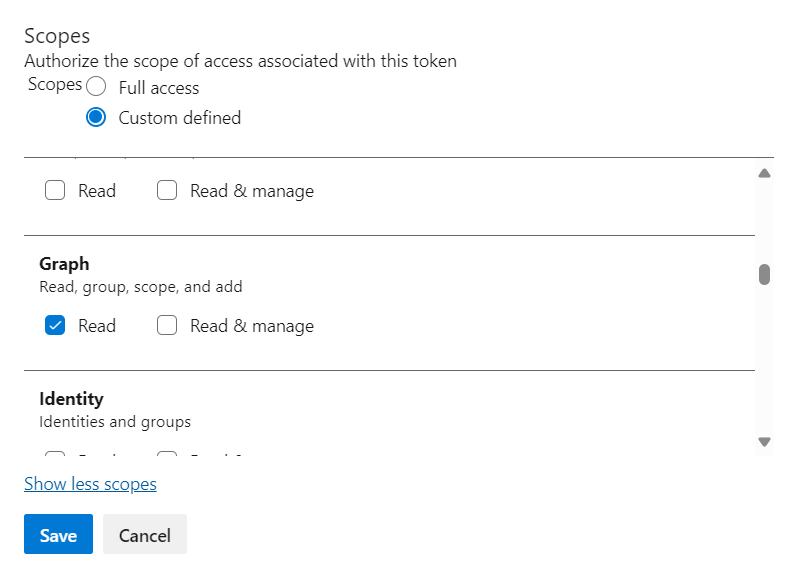
* If Azure DevOps Services is configured as a target system and any user field is mapped for synchronization.
* If the Azure DevOps Services (Cloud Deployment) is configured with personal access token as authentication mode.
**Actions:**
* The user needs to provide read permission of Graph for the given Personal Access Token.
**Reason:**
* Due to supporting service principal synchronization as a user, it is required to provide that permission.
***
## Migrating space.vars.SITENAME version to 7.172 or above
### Upgrade MSSQL Server to 2012 or above
**Applicable When:**
* If space.vars.SITENAME is installed with Microsoft SQL Server database version below 2012.
**Actions:**
* Upgrade Microsoft SQL Server to 2012 or above versions.
* Correct the connector JAR as mentioned in pre-migration checklist [here](#updating-the-mssql-2012-database-connector-jar).
**Reason:**
* From version 7.172 onward, deprecated support of Microsoft SQL Server versions below 2012.
***
### Updating the MSSQL 2012 database connector JAR
**Applicable When:**
* This update is necessary if space.vars.SITENAME is running on MSSQL 2012 and currently using the connector JAR package `sqljdbc_6.0.8112.100_enu.tar.gz`.
**Actions:** **Prerequisites**
1. If the current OIM version is lower than space.vars.SITENAME 7.143 and an upgrade to 7.172 is required, follow these steps:
* First, upgrade to space.vars.SITENAME 7.143 using the old JAR file, `sqljdbc_6.0.8112.100_enu.tar.gz`.
* After completing the migration to version 7.143, proceed with the steps mentioned below and then upgrade to version 7.172.
* Locate the old JAR file `sqljdbc42.jar` in the following directories:
* `/Connector_Jars/`
* `/OpsHubServer/lib/`
* Replace the old JAR file with the new JAR `mssql-jdbc-10.2.0.jre11.jar`:
* Download the new JAR from [this link](https://go.microsoft.com/fwlink/?linkid=2186164)
* Unzip the new connector JAR package `sqljdbc_10.2.0.0_enu.tar.gz`
* Locate `mssql-jdbc-10.2.0.jre11.jar` in the directory `sqljdbc_10.2.0.0_enu/sqljdbc_10.2/enu`
* Copy the new JAR to the directories mentioned above and delete the old JAR `sqljdbc42.jar` from both the locations.
* If Windows authentication is being used, follow these additional steps:
* Copy `mssql-jdbc_auth-10.2.0.x64.dll` from `sqljdbc_10.2.0.0_enu/sqljdbc_10.2/enu/auth/x64` to `/OpsHub_Resources/jre/bin`.
* Delete the existing `sqljdbc_auth.dll` located in `/OpsHub_Resources/jre/bin`.
**Reason:**
* Flyway has been updated from version 4.2 to 10.15, and the newer version does not support the connector JAR `sqljdbc42.jar`. Therefore, it is necessary to upgrade to `mssql-jdbc-10.2.0.jre11.jar` to maintain compatibility and avoid space.vars.SITENAME upgrade failure.
***
### Updating MSSQL 2014 or above database connector JAR
**Applicable When:**
* This update is necessary if space.vars.SITENAME is running on MSSQL 2014 or above and currently using the connector JAR package `sqljdbc_6.0.8112.100_enu.tar.gz`.
**Actions:** **Prerequisites**
1. If the current OIM version is lower than space.vars.SITENAME 7.143 and an upgrade to 7.172 is required, follow these steps:
* First, upgrade to space.vars.SITENAME 7.143 using the old JAR file, `sqljdbc_6.0.8112.100_enu.tar.gz`.
* After completing the migration to version 7.143, proceed with the steps mentioned below and then upgrade to version 7.172.
* Locate the old JAR file `sqljdbc42.jar` in the following directories:
* `/Connector_Jars/`
* `/OpsHubServer/lib/`
* Replace the old JAR file with the new JAR `mssql-jdbc-12.2.0.jre11.jar`:
* Download the new JAR from [this link](https://learn.microsoft.com/en-us/sql/connect/jdbc/release-notes-for-the-jdbc-driver?view=sql-server-ver16#122)
* Unzip the new connector JAR package `sqljdbc_12.2.0.0_enu.tar.gz`
* Locate `mssql-jdbc-12.2.0.jre11.jar` in the directory `sqljdbc_12.2.0.0_enu/sqljdbc_12.2/enu`
* Copy the new JAR to the directories mentioned above and delete the old JAR `sqljdbc42.jar` from both the locations.
* If Windows authentication is being used, follow these additional steps:
* Copy `mssql-jdbc_auth-12.2.0.x64.dll` from `sqljdbc_12.2.0.0_enu/sqljdbc_12.2/enu/auth/x64` to `/OpsHub_Resources/jre/bin`.
* Delete the existing `sqljdbc_auth.dll` located in `/OpsHub_Resources/jre/bin`.
**Reason:**
* Flyway has been updated from version 4.2 to 10.15, and the newer version does not support the connector JAR `sqljdbc42.jar`. Therefore, it is necessary to upgrade to `mssql-jdbc-12.2.0.jre11.jar` to maintain compatibility and avoid space.vars.SITENAME upgrade failure.
***
## Migrating space.vars.SITENAME version to 7.181 or above
### Link rename for OpenText ALM Octane
**Applicable When:**
* Integration configuration has failures and configuration involves OpenText ALM Octane Endpoint and any of the following relationship is configured: Originated defect, Originated feature, Originated epic, Originated user story, Originated quality story, Original defect, Original feature, Original epic, Original user story, Original quality story.
**Actions:**
* Resolve all the failures before upgrading space.vars.SITENAME.
**Reason:**
* Relationship link names are renamed after upgrade on space.vars.SITENAME. So failed-entity are required to be resolved first.
***
## Migrating space.vars.SITENAME 's version to 7.205 or above
### Improved Change Identification in Gerrit
**Applicable When**
* You are using **Gerrit** as one of the endpoints in your integration.
**Actions**
* Please contact **** for upgrade assistance.
**Reason**
* In earlier versions, Gerrit sometimes could not uniquely identify changes across repositories or branches, which could lead to errors.
* From **7.205 onwards**, the space.vars.SITENAME uses an improved ID format to ensure changes are always uniquely identified, avoiding such issues.