# Selenium
## Prerequisites
PHP Apache server is required to run Selenium Rest Service.
## System Configuration
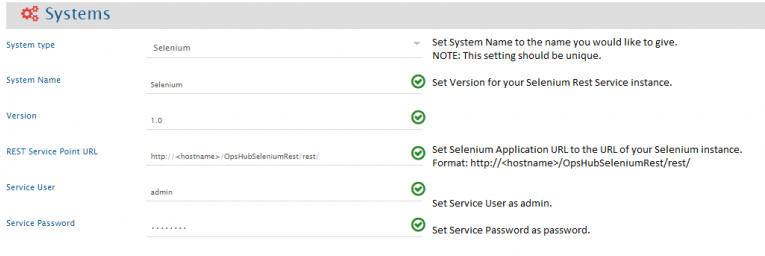
Before you continue to the integration, you must first configure Selenium onto space.vars.SITENAME. Click [System Configuration](https://docs.opshub.com/v7.216/integrate/configure-integrations/system-configuration) to learn the step-by-step process to configure a system.
Refer to the screenshot given below for reference.
If the system is deployed on HTTPS and a self-signed certificate is used, then you will have to import the SSL Certificate to be able to access the system from space.vars.SITENAME. Click [Import SSL Certificates](https://docs.opshub.com/v7.216/getting-started/installation/ssl-certificate-configuration) to learn how to import SSL certificate.
## Mapping Configuration
Map the fields between Selenium and the other system to be integrated to ensure that the data between both the systems synchronizes correctly.\
Click [Mapping Configuration](https://docs.opshub.com/v7.216/integrate/configure-integrations/mapping-configuration) to learn the step-by-step process to configure mapping between the systems.
## Integration Configuration
Set a time to synchronize data between Selenium and the other system to be integrated. Also, define parameters and conditions, if any, for integration.\
Click [Integration Configuration](https://docs.opshub.com/v7.216/integrate/configure-integrations/integration-configuration) to learn the step-by-step process to configure integration between two systems.
## Appendix
### Selenium Rest Service Installation
* Extract zip file from `/Other_Resources/Resources/OpsHubSeleniumRest.zip` to PHP Public directory.\
**For Example:** `E:/wamp/www/OpsHubSeleniumRest.zip`
* Open `config.php` file located at `OpsHubSeleniumRest/application/config/` directory and specify directory which you want to poll.
```php
/**
* Here User can define list of Selenium test directory
*/
$config[SELENIUM_DIRS] = [
"E:\\SeleniumTestScripts\\",
"E:\\FormLoader\\test\\"
];
```
* Require enabling Apache service `rewrite_module`.
* Open `http:///OpsHubSeleniumRest/rest/` URL to check service is properly deployed.
### Known Limitations
Only polling is supported for this connector.