# System Information
## View System Information
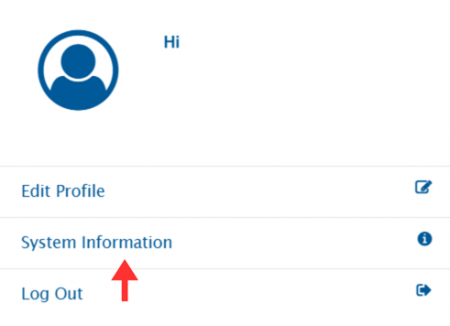
To view system information, click on the user profile icon in the top-right corner of the navigation bar.
Then click on System Information.
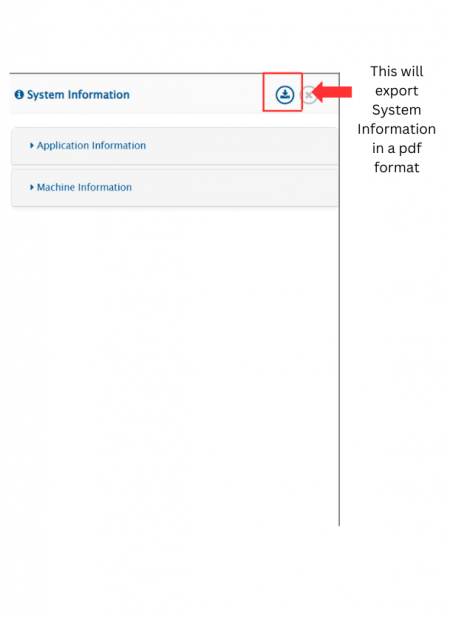
It will display the following window, with two sections: **Application Information** and **Machine Information**.
> **Note**: As highlighted in the screenshot below, system information can be exported in a pdf format.
## System Information Overview
### Application Information
**Integration Configurations**
* **Total Integrations:** Number of configured integrations
* **Active Integrations:** Currently active integrations
* **Inactive Integrations:** Inactive integrations
* **Cache Timeout:** Cache expiration time (minutes)
**Thread Info**
* **Total Threads:** Allocated threads
* **Active Threads:** Currently active threads
**Log Settings**
* **Global Log Settings**
* **Size of Global Log Files:** Maximum size limit in MB
* **No of Max Backup Global Log Files:** Maximum number of backup files
* **Global Level Integration Log Settings**
* **Log Level:** Current integration log level
* **Size of Integration Log Files:** Maximum size limit in MB
* **No of Max Backup Integration Log Files:** Maximum number of backup files at integration level
**HTTP Connection Info**
* **Total Connections:** Maximum HTTP connections
* **Acquired Connections:** Connections that are currently in use
**Database Configurations**
* **Type:** Database type and version
* **Username:** Database access username
* **Name:** Database name
* **Schema:** Database schema
* **Allowed Connections:** Maximum allowed database connections
* **Active Connections:** Active database connections that are currently in use
**Memory Details**
* **Max Memory Allocated:** Maximum allocated memory
* **Min Memory Allocated:** Minimum allocated memory
* **Used Memory:** Current memory usage
**Directory Configurations**
* space.vars.SITENAME **Folder Size:** Application folder size
* **Remaining Space on Drive:** Available free space on drive where space.vars.SITENAME is installed
* **Logs Folder Size:** Indicates log directory size
* **Total Space on Drive:** Total drive capacity where space.vars.SITENAME is installed
**Version Details**
* **Current Version:** Installed space.vars.SITENAME version
* **Initial Version:** First installed version of space.vars.SITENAME
### Machine Information
* **Operating System:** OS and its version
* **CPU Cores:** Number of CPU cores
* **Time Zone & Region:** Time zone settings
* **Total Physical Memory:** Total system memory