# ETM – Keyword Configuration
## ETM as a Source
When **ETM is the source** and the **target system does not support Keywords**, the keywords entity is synced as regular test steps.
OpsHub **preserves a reference** to the original keyword by appending a special identifier to the step description.
Integration required:
This allows:
* Syncing **Test steps to keywords** when syncing back to ETM.
* Maintaining **step-level traceability** across systems.
### Keyword Identifier
* Format: `[OH_KY_DO_NOT_EDIT:keyword:]`
* Example: `[OH_KY_DO_NOT_EDIT:keyword:38]`
* Placed at the **end of the step description**.
* Used to track keyword-to-step mapping.
### Guidelines
* You can edit the step content, but:
* **Do not delete or change** the identifier.
* Add custom content **before** the identifier, if needed.
* Modifying or removing the identifier may **break reverse sync** or lead to **loss of traceability**.
## ETM as a Target with Non-Keyword Support
When syncing from a non-keyword supported connector like **Zephyr back to ETM**, keyword preservation follows these rules:
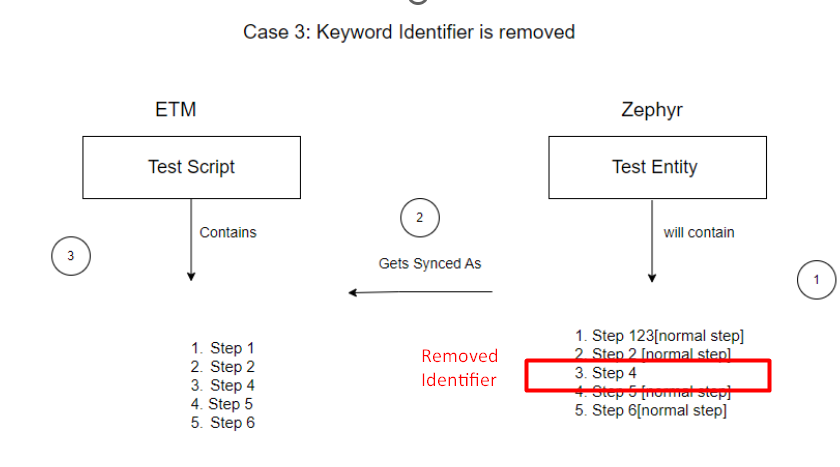
* In Zephyr-to-ETM synchronization, we **do not support creating new keywords** once they have already been created.
* Therefore, if a user:
* A keyword has two steps synced to Zephyr with indexes `1` and `2`, both containing the identifier `OH_KY_DO_NOT_EDIT:keyword_id`.
* During reverse sync (ETM → Zephyr), if the identifier is removed from step `2`, that step is still part of the keyword since step `1` retains it.
* The keyword in ETM remains unchanged.
* If the identifier is removed from **both steps** in Zephyr:
* Those steps **lose traceability** and sync as **regular test steps** in ETM.
### Important Behavior
* If all steps related to a keyword are removed from Zephyr:
* The corresponding keyword is also removed from ETM.
### Side Effect in Reverse Sync
* If only some keyword steps are removed in Zephyr:
* The keyword still exists in ETM.
* During the next sync from ETM to Zephyr:
* All keyword steps (including previously removed ones) will be re-synced.
* Ensures consistency with ETM but may **reintroduce deleted steps** in Zephyr.
### Preventing Keyword Step Resync
* If users **do not want to sync keyword steps** from ETM to Zephyr:
* They must use **advanced XSLT** logic.
* This logic should **filter out steps** that lack a valid keyword identifier (`[OH_KY_DO_NOT_EDIT:keyword:]`) in their description.
* This helps maintain control and avoid syncing undesired keyword steps back to Zephyr.
## ETM to Target with Keyword Support \[Supports Keyword Write]
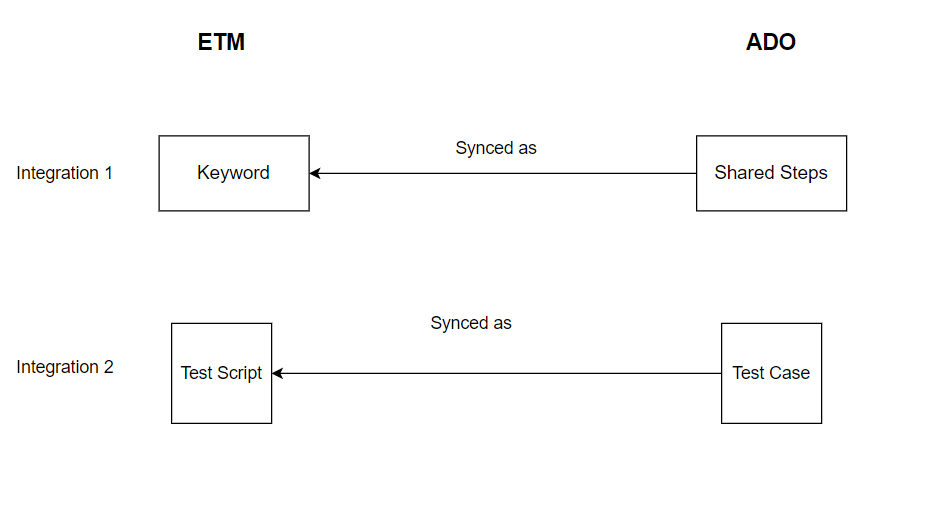
Since ADO supports **Shared Steps** (a separate entity type), if users want to sync ETM **Keywords as Shared Steps**, then:
* The **Keyword** must be mapped as an **Entity** in the integration.
* Otherwise, if only the normal Test Script is mapped, all the same behavior as **ETM to Zephyr** applies.
### Integration Setup
To properly sync ETM Keywords and Test Cases to ADO, users must set up **two separate integrations**:
1. **Shared Steps → Keywords**
* Requires an **advanced XSL** to transform Shared Steps into ETM-compatible Keyword format.
2. **Test Case → Test Script**
* Requires an **advanced workflow**: `Default Integration Workflow -keyword.xml`
#### XSL for Syncing Shared Steps from ADO to ETM Keywords
Below is the advanced XSL used to transform ADO Shared Steps into ETM-compatible keyword steps:
```xml
```
#### Additional Notes
The recommended sync order is:
1. First, sync Shared Steps as Keywords.
2. Then, sync the original Test Cases that reference those Shared Steps to the target.
This ensures all keyword-related references are synced correctly and consistently across the system.