# Role Configuration

## Overview

<code class="expression">space.vars.SITENAME</code> supports User Access Control, enabling users manage permissions in <code class="expression">space.vars.SITENAME</code> by associating users with specific roles. Each role encapsulates a set of permissions suited to particular responsibilities.

## Permission

Permission refers to specific rights like Read, Write, Delete, Grant on different resources like System, Mapping, Integration, User Management associated with a given role.

## Role

* A Role is a set of permissions that define what actions a user is permitted to perform on a resource.
* Integration Role:
  * An Integration role allows user to configure permissions for operations that can be performed on **Integration** tab in <code class="expression">space.vars.SITENAME</code> like System, Mapping, Integration, etc.
  * Refer to [Associating Integration Role to a User](https://docs.opshub.com/v7.216/manage/administrator/user-role-association#associating-integration-role-to-a-user) section to understand how integration roles can be associated with user.
* Administration Role:
  * An Administration role allows user to configure permissions for operations that can be performed on **Administration** in <code class="expression">space.vars.SITENAME</code> tab like Proxy Settings, License Management, etc.
  * Refer to [Associating Administration Role to a User](https://docs.opshub.com/v7.216/manage/administrator/user-role-association#associating-administration-role-to-a-user) section to understand how administration roles can be associated with user.

## Default Roles

<code class="expression">space.vars.SITENAME</code> provides with the following default roles:

| **Role Name**       | **Description**                                                                                                                                                                                                                                                                                                                                                                                                                                                                                                                                       |
| ------------------- | ----------------------------------------------------------------------------------------------------------------------------------------------------------------------------------------------------------------------------------------------------------------------------------------------------------------------------------------------------------------------------------------------------------------------------------------------------------------------------------------------------------------------------------------------------- |
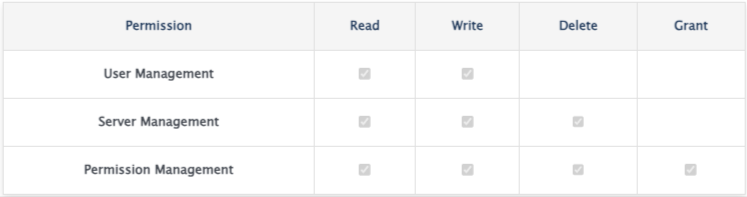
| Super Administrator | <p>All administration permissions are available<br></p><p><img src="https://3739347370-files.gitbook.io/~/files/v0/b/gitbook-x-prod.appspot.com/o/spaces%2F1a8GpUm2lq3lKbytaYjt%2Fuploads%2Fgit-blob-01c5ca053540eb0359116dceaa009815fe36ad7c%2FSuper_Administrator.png?alt=media" alt="" data-size="original"></p>                                                                                                                                                                                                                                   |
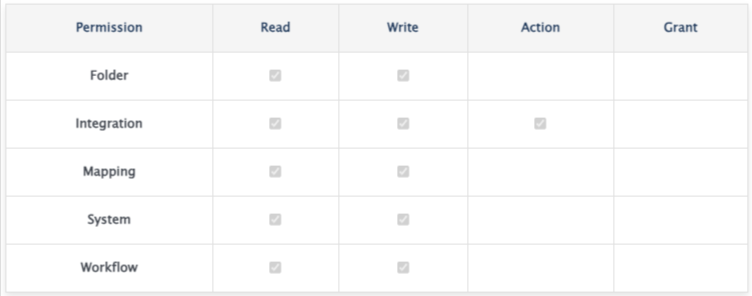
| Sync Administrator  | <p>All integration permissions are available<br></p><p><img src="https://3739347370-files.gitbook.io/~/files/v0/b/gitbook-x-prod.appspot.com/o/spaces%2F1a8GpUm2lq3lKbytaYjt%2Fuploads%2Fgit-blob-5744ca33159a58d9bfe7551372d15e341c22d810%2FSync_Administrator.png?alt=media" alt="" data-size="original"></p>                                                                                                                                                                                                                                       |
| Sync Monitor        | <p>All read and sync action permissions are available<br><img src="https://3739347370-files.gitbook.io/~/files/v0/b/gitbook-x-prod.appspot.com/o/spaces%2F1a8GpUm2lq3lKbytaYjt%2Fuploads%2Fgit-blob-01fc0ef9c7a33025be17c0b513a599555f7edae4%2FSyn_Monitor.png?alt=media" alt="Sync Monitor"></p><p><img src="https://3739347370-files.gitbook.io/~/files/v0/b/gitbook-x-prod.appspot.com/o/spaces%2F1a8GpUm2lq3lKbytaYjt%2Fuploads%2Fgit-blob-01fc0ef9c7a33025be17c0b513a599555f7edae4%2FSyn_Monitor.png?alt=media" alt="" data-size="original"></p> |
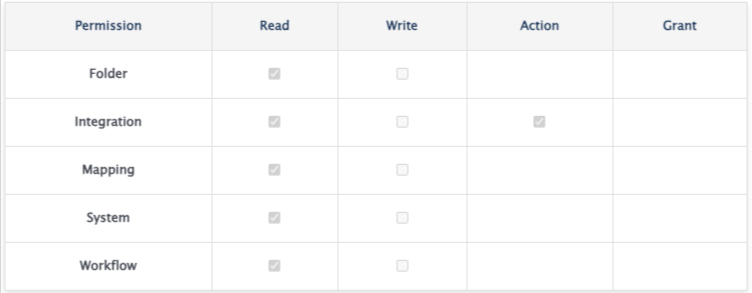
## Create Custom Roles

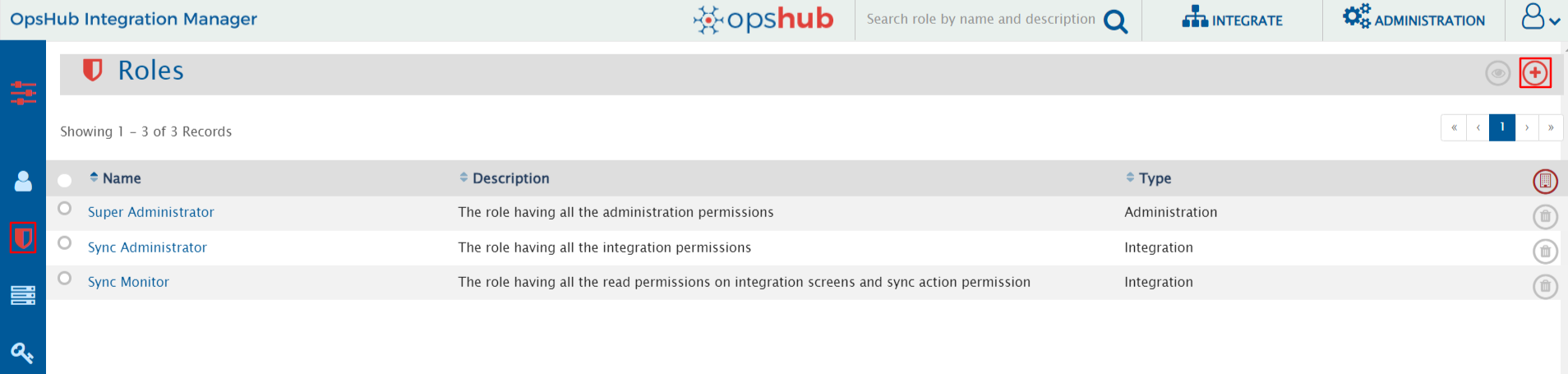
* Navigate to **Role Management** screen under **Administration** tab and click on Create Role button on the top right corner as shown below:

  <div align="center"><img src="https://3739347370-files.gitbook.io/~/files/v0/b/gitbook-x-prod.appspot.com/o/spaces%2F1a8GpUm2lq3lKbytaYjt%2Fuploads%2Fgit-blob-284f218022aeebf42d4325932eb75bf6a84eb0af%2FCreateRole.png?alt=media" alt="" width="1300"></div>
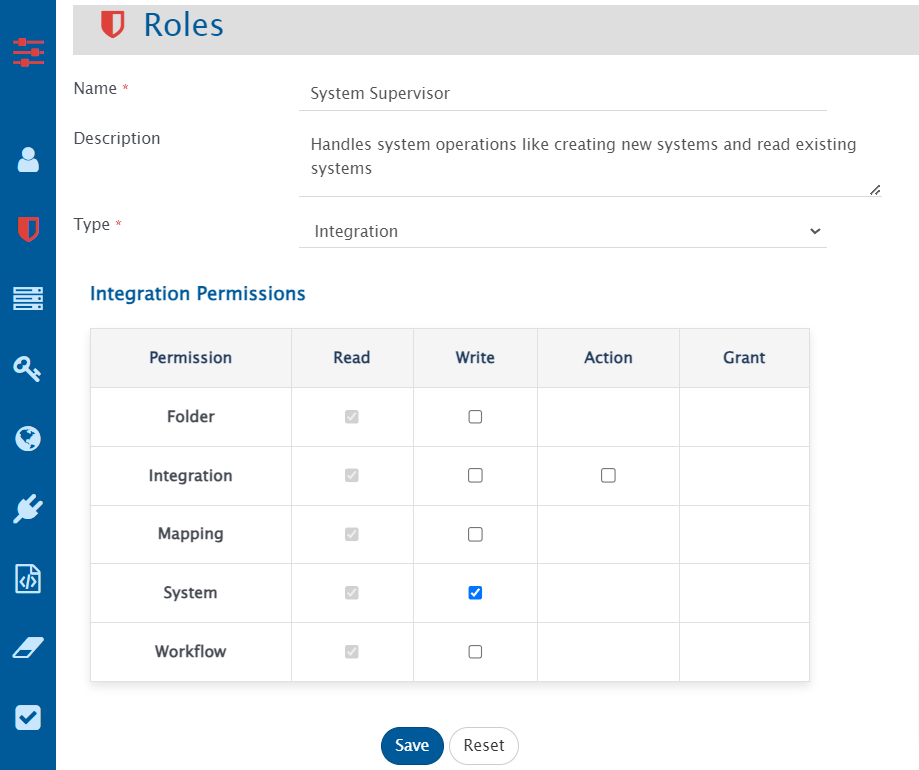
* Add Role Name, Description, Type and select permissions that a user want to associate with the role. For instance, if a role is to be configured for performing all system operations, select **Integration** under Role type and tick mark **write** permission checkbox as shown below:

  <div align="center"><img src="https://3739347370-files.gitbook.io/~/files/v0/b/gitbook-x-prod.appspot.com/o/spaces%2F1a8GpUm2lq3lKbytaYjt%2Fuploads%2Fgit-blob-03f87a8eb6c57b313de57603e96047af84cdac7f%2FSystem_Supervisor_Role.png?alt=media" alt="" width="805"></div>
* Save the role and it will be accessible from **Role Management** screen as shown below:

  <div align="center"><img src="https://3739347370-files.gitbook.io/~/files/v0/b/gitbook-x-prod.appspot.com/o/spaces%2F1a8GpUm2lq3lKbytaYjt%2Fuploads%2Fgit-blob-50bb78cfda2ddb5a6bda0d96146a5d8c84b148fe%2FRole_saved_successfully.png?alt=media" alt="" width="1300"></div>

## Standard Role Behaviors

* In Integration type role, **read** permission is granted by default on all resources like System, Mapping, Folder, etc.
* In Integration type role, with **Write** permission, **Action** permission is granted by default for **Integration**.
* Default roles cannot be edited or deleted.
* In Administration type Role, with **write** permission on **User Management**, all write operations can be performed in all user accounts.
* Role type cannot be changed after the role is created.

## Permissions and Corresponding Actions

* Permissions and operations that can be performed are listed below:

| **Permission Name**                                                                          | **Permission Scope** | **Actions Supported**                                                                                                                                                                                               |
| -------------------------------------------------------------------------------------------- | -------------------- | ------------------------------------------------------------------------------------------------------------------------------------------------------------------------------------------------------------------- |
| **Integration Permissions**                                                                  |                      |                                                                                                                                                                                                                     |
| Folder                                                                                       | Read                 | Read Folders                                                                                                                                                                                                        |
| Folder                                                                                       | Write                | Create, update, delete folders                                                                                                                                                                                      |
| Folder                                                                                       | Grant                | Allows user to manage integration permissions of other users on the folders on which the user has access                                                                                                            |
| Integration                                                                                  | Read                 | <p>Read integrations, reconciliations, failures<br>Export sync report<br>Read failure notifications' configuration</p>                                                                                              |
| Integration                                                                                  | Write                | <p>Create, update, delete, merge, move integrations<br>Create, update reconciliations</p>                                                                                                                           |
| Integration                                                                                  | Action               | <p>Failures: Retry, delete, edit event xml, configure failure notifications<br>Integrations: Activate, inactive, execute<br>Delete Synchronization: Execute<br>Switch to integration mode (from reconciliation)</p> |
| Mapping                                                                                      | Read                 | <p>Read, import, export mappings<br>Read, export excel uploads</p>                                                                                                                                                  |
| Mapping                                                                                      | Write                | <p>Create, update, delete, clone, merge, move mappings<br>Create, update, delete excel uploads</p>                                                                                                                  |
| System                                                                                       | Read                 | Read systems                                                                                                                                                                                                        |
| System                                                                                       | Write                | Create, update, move systems                                                                                                                                                                                        |
| Workflow                                                                                     | Read                 | Read, export workflows                                                                                                                                                                                              |
| Workflow                                                                                     | Write                | Create, update, move, delete workflows                                                                                                                                                                              |
| *Note:* Move operation requires **write** permission in both source and destination folders. |                      |                                                                                                                                                                                                                     |
| **Administration Permissions**                                                               |                      |                                                                                                                                                                                                                     |
| User Management                                                                              | Read                 | <p>Read users<br>Read login servers</p>                                                                                                                                                                             |
| User Management                                                                              | Write                | <p>Create, update users<br>Create, update login servers</p>                                                                                                                                                         |
| Server Management                                                                            | Read                 | <p>Read licenses<br>Read proxy settings<br>Read registered connectors<br>Read system logs<br>Read purge<br>Read rules management<br>Read schedule</p>                                                               |
| Server Management                                                                            | Write                | <p>Install license<br>Update proxy settings<br>Create, update registered connectors<br>Create, update rules management<br>Create, update schedules</p>                                                              |
| Server Management                                                                            | Delete               | <p>Uninstall License<br>Apply purge<br>Delete rules management<br>Delete schedules</p>                                                                                                                              |
| Permission Management                                                                        | Read                 | Read roles                                                                                                                                                                                                          |
| Permission Management                                                                        | Write                | Create, update roles                                                                                                                                                                                                |
| Permission Management                                                                        | Delete               | Delete roles                                                                                                                                                                                                        |
| Permission Management                                                                        | Grant                | Grant permissions to other users                                                                                                                                                                                    |