> For the complete documentation index, see [llms.txt](https://docs.opshub.com/llms.txt). Markdown versions of documentation pages are available by appending `.md` to page URLs; this page is available as [Markdown](https://docs.opshub.com/knowledge-resource-index/integration-combination-examples/how-to-configure-keywords.md).
# ETM – Keyword Configuration
## ETM as a Source
When **ETM is the source** and the **target system does not support Keywords**, the keywords entity is synced as regular test steps.
OpsHub **preserves a reference** to the original keyword by appending a special identifier to the step description.
Integration required:
This allows:
* Syncing **Test steps to keywords** when syncing back to ETM.
* Maintaining **step-level traceability** across systems.
### Keyword Identifier
* Format: `[OH_KY_DO_NOT_EDIT:keyword:]`
* Example: `[OH_KY_DO_NOT_EDIT:keyword:38]`
* Placed at the **end of the step description**.
* Used to track keyword-to-step mapping.
### Guidelines
* You can edit the step content, but:
* **Do not delete or change** the identifier.
* Add custom content **before** the identifier, if needed.
* Modifying or removing the identifier may **break reverse sync** or lead to **loss of traceability**.
## ETM as a Target with Non-Keyword Support
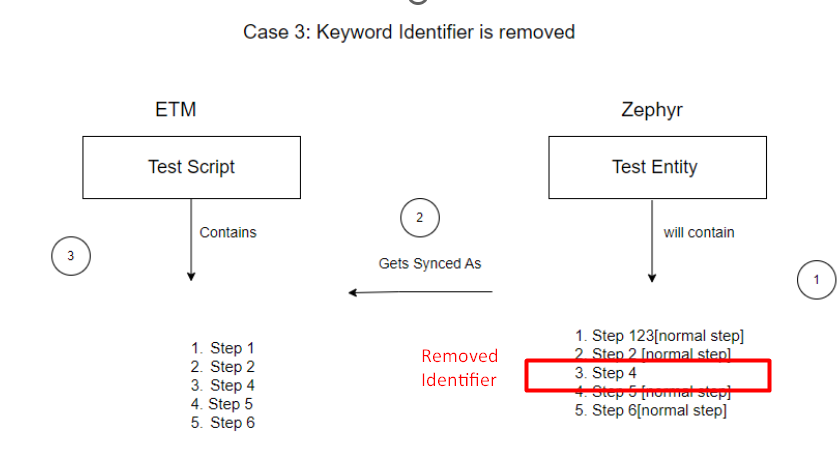
When syncing from a non-keyword supported connector like **Zephyr back to ETM**, keyword preservation follows these rules:
* In Zephyr-to-ETM synchronization, we **do not support creating new keywords** once they have already been created.
* Therefore, if a user:
* A keyword has two steps synced to Zephyr with indexes `1` and `2`, both containing the identifier `OH_KY_DO_NOT_EDIT:keyword_id`.
* During reverse sync (ETM → Zephyr), if the identifier is removed from step `2`, that step is still part of the keyword since step `1` retains it.
* The keyword in ETM remains unchanged.
* If the identifier is removed from **both steps** in Zephyr:
* Those steps **lose traceability** and sync as **regular test steps** in ETM.
### Important Behavior
* If all steps related to a keyword are removed from Zephyr:
* The corresponding keyword is also removed from ETM.
### Side Effect in Reverse Sync
* If only some keyword steps are removed in Zephyr:
* The keyword still exists in ETM.
* During the next sync from ETM to Zephyr:
* All keyword steps (including previously removed ones) will be re-synced.
* Ensures consistency with ETM but may **reintroduce deleted steps** in Zephyr.
### Preventing Keyword Step Resync
* If users **do not want to sync keyword steps** from ETM to Zephyr:
* They must use **advanced XSLT** logic.
* This logic should **filter out steps** that lack a valid keyword identifier (`[OH_KY_DO_NOT_EDIT:keyword:]`) in their description.
* This helps maintain control and avoid syncing undesired keyword steps back to Zephyr.
## ETM to Target with Keyword Support \[Supports Keyword Write]
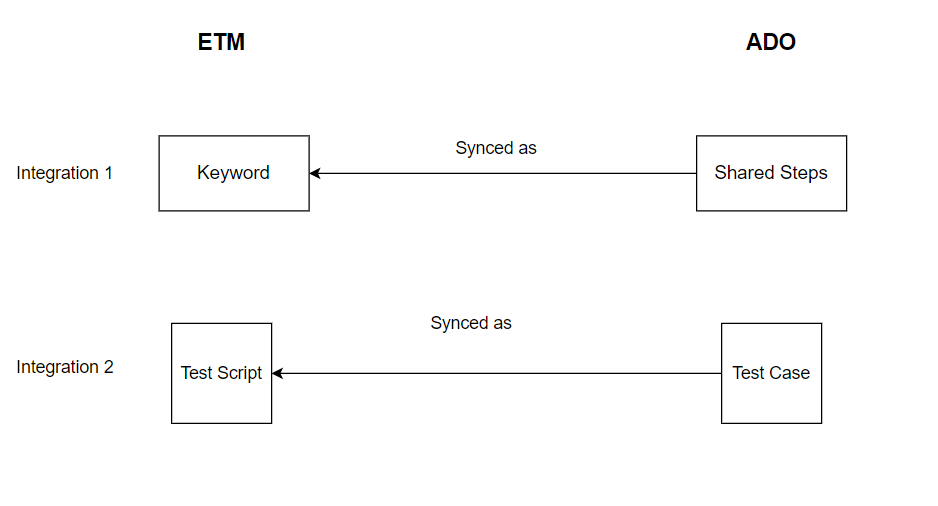
Since ADO supports **Shared Steps** (a separate entity type), if users want to sync ETM **Keywords as Shared Steps**, then:
* The **Keyword** must be mapped as an **Entity** in the integration.
* Otherwise, if only the normal Test Script is mapped, all the same behavior as **ETM to Zephyr** applies.
### Integration Setup
To properly sync ETM Keywords and Test Cases to ADO, users must set up **two separate integrations**:
1. **Shared Steps → Keywords**
* Requires an **advanced XSL** to transform Shared Steps into ETM-compatible Keyword format.
2. **Test Case → Test Script**
* Requires an **advanced workflow**: `Default Integration Workflow -keyword.xml`
#### XSL for Syncing Shared Steps from ADO to ETM Keywords
Below is the advanced XSL used to transform ADO Shared Steps into ETM-compatible keyword steps:
```xml
```
#### Additional Notes
The recommended sync order is:
1. First, sync Shared Steps as Keywords.
2. Then, sync the original Test Cases that reference those Shared Steps to the target.
This ensures all keyword-related references are synced correctly and consistently across the system.
---
# Agent Instructions
This documentation is published with GitBook. GitBook is the documentation platform designed so that both humans and AI agents can read, navigate, and reason over technical content effectively. Learn more at gitbook.com.
## Querying This Documentation
If you need additional information that is not directly available in this page, you can query the documentation dynamically by asking a question.
Perform an HTTP GET request on the current page URL with the `ask` query parameter, and the optional `goal` query parameter:
```
GET https://docs.opshub.com/knowledge-resource-index/integration-combination-examples/how-to-configure-keywords.md?ask=&goal=
```
`ask` is the immediate question: it should be specific, self-contained, and written in natural language.
`goal` is optional and describes the broader end goal you are ultimately trying to accomplish on behalf of the user. GitBook uses it to tailor the answer towards what is most useful for that goal.
The response will contain a direct answer to the question and relevant excerpts and sources from the documentation.
Use this mechanism when the answer is not explicitly present in the current page, you need clarification or additional context, or you want to retrieve related documentation sections.