# Post Migration Checklists
> 👉 **Looking for older version steps?**\
> Refer to the [Post-Migration Checklist (MediaWiki)](https://docs.myopshub.com/oim/index.php/Post-Migration_Checklist) for space.vars.SITENAME versions prior to 7.175.
## Migrating space.vars.SITENAME version to 7.175 or above
### Update the Advance XSLT used for Jira Zephyr Test-step results
**Applicable When**
* System: Jira Zephyr
* Entity: Test Execution
* Field: Step Results
* Scenario: Step Result field is mapped as a source using advance XSLT.
**Actions**
* The source XML path for the step result field needs to be changed. Replace the following instance with mentioned replacement:
* `[SourceXML/updatedFields/Property/stepResult/*]` replace with `[SourceXML/updatedFields/Property/stepResult/Property/*]`
* Replace the path of step result fields with `Property/[fieldName]`:
* Example: Replace `status` with `Property/status`
* For more details refer: [Sample advanced mapping for Jira Zephyr Test Execution](https://docs.opshub.com/connectors/jira#supported-relationships)
**Reason**
* Step Results were stored as a List in old values, and as a Hashmap in new values. This inconsistency can cause failures in parsing list of step results correctly.
* For maintaining consistency between old values and new values in the event xml, the format has been changed to List of step results.
### Change the SAML IDP Single sign-on URL
**Applicable When**
* SAML-based authentication is configured in space.vars.SITENAME.
**Actions**
* The user has already configured SAML Identity Provider. Example., OKTA, Azure Active Directory, etc.
* In SAML Identity Provider configuration, the user can find the single sign-on URL field under the SAML settings.
* The user must change the single sign-on URL in SAML Identity Provider when space.vars.SITENAME is installed with HTTP protocol:
* Current configuration: `http://localhost:8989/OpsHubWS/saml/SSO`
* Updated URL configuration must be: `http://localhost:8989/OpsHubWS/login/saml2/sso/opshubsaml`
* The user must change the single sign-on URL in SAML Identity Provider when space.vars.SITENAME is installed with HTTPS protocol:
* Current configuration: `https://localhost:8443/OpsHubWS/saml/SSO`
* Updated URL configuration must be: `https://localhost:8443/OpsHubWS/login/saml2/sso/opshubsaml`
**Reason**
* Going forward, space.vars.SITENAME will use Spring Security Saml2 service provider to support SAML-based authentication. It will also eliminate vulnerabilities of older SAML framework.
## Migrating space.vars.SITENAME version to 7.176 or above
### Update .NET framework to 4.7.2 or above
**Applicable When**
* OpsHubEAWindowsService is configured on a machine with a .NET framework version below 4.7.2.
**Actions**
* Install .NET framework 4.7.2 on the machine where OpsHubEAWindowsService is configured.
* Check [software and hardware requirements](https://docs.microsoft.com/en-us/dotnet/framework/get-started/system-requirements) to install .NET Framework 4.7.2
> **Note** : We recommend to uninstall any other .NET framework installed previously, to avoid any conflict.
**Reason**
* .NET Framework version 4.0 is out of support. Therefore, dependency on .NET framework version 4.0 has also been removed.
## Migrating space.vars.SITENAME version to 7.177 or above
### Workflow Change for Any Customized Workflow
Pls refer, How to identify between Custom and Default Workflows and their associated integrations?
**Applicable When**
* The user has configured a customized workflow that is still in use.
**Actions**
* If advanced customizations are applied using old system and custom properties, users must open the customized workflow and update it to ensure compatibility with the current expected format to avoid failures.
* From version 7.177 onward, when retrieving specific properties from old values, the syntax of the code snippet needs to be updated to avoid conflicts.
**Workflow Code Example**
**Before modification:**
```java
HashMap sysProp = mappedProperties.get(Constants.NEWSYSTEMPROP);
HashMap custProp = mappedProperties.get(Constants.NEWCUSTOMPROP);
HashMap oldSystemValues = mappedProperties.get(Constants.OLDSYSTEMPROP);
HashMap oldCustomValues = mappedProperties.get(Constants.OLDSYSTEMPROP);
// code comment: fetching avoid conflict map from old custom values
HashMap avoidConflictCustProps = oldCustomValues.get("AvoidConflict");
// code comment: fetching status value from avoid conflict map
String status = avoidConflictCustProps.get("Status");
```
**After modification:**
```java
HashMap sysProp = mappedProperties.get(Constants.NEWSYSTEMPROP);
HashMap custProp = mappedProperties.get(Constants.NEWCUSTOMPROP);
HashMap oldSystemValues = mappedProperties.get(Constants.OLDSYSTEMPROP);
HashMap oldCustomValues = mappedProperties.get(Constants.OLDSYSTEMPROP);
// code comment: fetching status value from old custom values
String status = oldCustomValues.get("status");
```
#### Reason
Starting with version 7.177, all properties are directly accessible from the old properties map. The intermediate "avoid conflict" map has been removed.
***
## Migrating space.vars.SITENAME version to 7.181 or above
### Remap values of lookup field when it contains special character(s)
#### Applicable When
Values for lookup field contains special characters (tab space) in the source/target system, even though these special characters are not visible in the lookup values of space.vars.SITENAME.
#### Actions
After upgrading space.vars.SITENAME, remap the lookup field that contains lookup values with the above specified special characters.
The following specified characters need to have their lookup field values remapped:
* Tab Space: `\t`
#### Reason
To regenerate XSLT to synchronize the actual value with the above mentioned special characters.
***
### Update Relationship Configuration for OpenText ALM Octane Endpoint
#### Applicable When
The user has configured any of the following relationship in integration configuration involving OpenText ALM Octane Endpoint. Originated defect, Originated feature, Originated epic, Originated user story, Originated quality story, Original defect, Original feature, Original epic, Original user story, Original quality story.
#### Prerequisite
Resolve all the failures for the configurations that requires update.
#### Actions
Open mapping configurations with mention relationships configured. Remove mentioned linkages and replace them as per following new linkages:
| Old link name | New link name |
| ------------------------ | -------------------------- |
| Originated defect | Defect (Trace to) |
| Originated feature | Feature (Trace to) |
| Originated epic | Epic (Trace to) |
| Originated user story | Story (Trace to) |
| Originated quality story | Quality Story (Trace to) |
| Original defect | Defect (Trace from) |
| Original feature | Feature (Trace from) |
| Original epic | Epic (Trace from) |
| Original user story | Story (Trace from) |
| Original quality story | Quality Story (Trace from) |
#### Reason
This makes link names visible in space.vars.SITENAME aligned with link names visible in OpenText ALM Octane UI for respective entity types.
## Migrating space.vars.SITENAME version to 7.184 or above
### Update the Criteria Query Or Lookup Query for Tricentis qTest Module
#### Applicable When
* If integration is configured with qTest as source system for **Module** entity with criteria configuration:
* To identify if criteria is configured for the integration, refer [Integration Criteria Configuration](https://docs.opshub.com/integrate/configure-integrations/integration-configuration#criteria-configuration).
* If target lookup or default query is configured with qTest as target system for **Module** entity.
#### Actions
* Earlier, if the query was, for example, `search=test`, it should be updated in JSON format as:\
`{"search":"test","expand":"descendants"}`
* `"expand"` should be added as it was the default query parameter used previously, along with "search".
* For more details, refer to [criteria configuration](https://docs.opshub.com/connectors/tricentis-qtest#criteria-configuration) and [Target Lookup Configuration](https://docs.opshub.com/connectors/tricentis-qtest#target-lookup-configuration) sections.
#### Reason
* Enhanced filtering for qTest module entity to support **expand** and **parentId** along with search query parameters.
## Migrating space.vars.SITENAME version to 7.186 or above
### Update Relationship Mapping for Cycle Entity in OpenText ALM Quality Center
**Applicable When**
* If the integration is configured with OpenText ALM Quality Center as the target system for the **Cycle** entity.
**Actions**
* Map the parent link in the **Cycle** entity using the required default lookup query.
* Remove the **Release ID** field from the field mapping, as it is now redundant configuration after relationship mapping update.
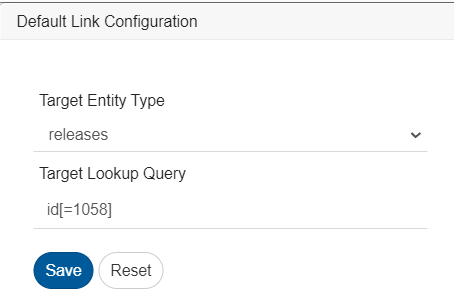
* For instance, if the **Release ID** was previously mapped with the default value `'1058'`, update the relationship configuration to utilize the default lookup query: `'id[=1058]'` for the corresponding linking release.
**Reason**
* The Cycle entity now includes enhanced support for linking to its parent release through name, ID, or a custom field using lookup query. Given that the Release is a mandatory link for cycle entity, the relationship mapping needs to be updated, and it is recommended to remove the Release ID field from the mapping.
***
### GitLab mapping configuration changes for Epic
**Applicable When**
* If an integration is configured with GitLab as the target system where **Start Date** and **End Date** fields are mapped for the epic entity.
**Actions**
* To synchronize fixed values for **Start Date** and **End Date**, **Date Type lookup field** must be mapped with the default value as `"Fixed"`; otherwise, it will result in processing failure.
* If **Start Date** and **End Date** field values need to be inherited from related milestone, **Date Type lookup field** must be mapped with the default value as `"Inherited"`.
For more details, please refer to [Gitlab connector mapping configurations](https://docs.opshub.com/connectors/gitlab#mapping-configuration).
**Reason**
* To support inherited date fields from the milestone, a Date Type lookup field has been introduced. If `"Inherited"` is selected, the Start Date and End Date fields are not required.
***
## Migrating space.vars.SITENAME version to 7.189 or above
### Update the JSON input for Jira Xray Cloud Entity Display Name
**Applicable When**
* The deployment type is Cloud and Xray is selected as the test management plugin, and user has renamed any entity's display name.
**Actions**
* Update the value of field **Xray Entity Names** in Jira system configuration according to the current entity display name.
* For example, if `Test` entity is renamed to `Xray Test`, the input value must be modified as:
```json
[
{
"defaultEntityName": "Test",
"currentEntityDisplayName": "Xray Test"
},
{
"defaultEntityName": "Precondition",
"currentEntityDisplayName": "Precondition"
},
{
"defaultEntityName": "Test Set",
"currentEntityDisplayName": "Test Set"
},
{
"defaultEntityName": "Test Plan",
"currentEntityDisplayName": "Test Plan"
},
{
"defaultEntityName": "Test Execution",
"currentEntityDisplayName": "Test Execution"
},
{
"defaultEntityName": "Test Run",
"currentEntityDisplayName": "Test Run"
}
]
```
* Refer to [Jira Xray entity names](https://docs.opshub.com/connectors/jira#xray-entity-names) section for more details.
**Reason** The prerequisite to rename Jira Xray entities has been removed.
## Migrating space.vars.SITENAME version to 7.195 or above
### Data type changes for Text type of fields in TestRail
**Applicable When**
* If the integration is configured with TestRail as one of the systems, with mapped fields of Text type
**Actions**
* Some of the text type fields' datatype has been changed to Markdown, remapping for them will be required.
**Reason**
* As per Testrail Documentation, a few field types are Text types, but they provide Markdown behavior. To preserve user experience, we have changed these fields to Markdown datatype.
***
## Migrating space.vars.SITENAME version to 7.196 or above
### Update .py files used in commit hooks
**Applicable When**
* Using any hooks provided in `/Other_Resources/Hooks`. For systems including SVN, Accurev, ClearCase, Git, Mercurial, and Perforce
**Actions**
* Use the latest `.py` files available in the installation directory, for the respective system in folder `/Other_Resources/Hooks`.
Refer to respective section links for Commit Hooks setup: [SVN](https://docs.opshub.com/connectors/svn#configuring-and-installing-the-hook), [Git](https://docs.opshub.com/connectors/git#git-hook-configuration)
**Reason**
* This is to make sure these additional configurations are in alignment with our updated security standards.
***
### Recover Entity Type Mapping in Relationship Configuration
> ⚠️ This can be a breaking change. Kindly review thoroughly.
#### Applicable When
* Any integration where relationship sync is enabled.
#### Actions Taken by OIM
* During OIM upgrade, **entity type mappings will be removed** from relationship configurations.
* OIM will **automatically identify the target linked entity type** using entity type mapping at the integration level.
#### How OIM Detects Entity Type Mapping
* OIM checks the **linked entity** defined in the relationship.
* It automatically finds the equivalent target entity for the linked source entity.
* Entity type mapping is no longer needed for automatic detection.
* This works well when one source maps to one target.
* If multiple mappings exist, manual setup may be needed.
* If **manual entity type mapping is needed after migration**, you can refer to the backed-up mapping data created by OIM when it removes entity type mappings from relationship configurations.
> *Note: The Bypass Link Entity Type Mapping add-on is required in your license to enable manual entity type mapping.*
#### Backup Location
Removed entity type mappings are saved at the following path: \&#xNAN;**`/AppData/LinkEntityTypeMapping`**
## Migrating space.vars.SITENAME version to 7.199 or above
### Remap values of lookup field **Planned For** in IBM Engineering Workflow Management
**Applicable When**
* The **Planned For** field is configured in Mapping Configuration for the IBM Engineering Workflow Management end system.
**Actions**
* Open the mapping configuration where **Planned For** field is mapped.
* Delete those value mappings (displaying in red colour) where the display name has changed from a simple leaf node name to a full hierarchical path, and remap them as per the use case.
* For example, if the value node Child1 was previously displayed as "Child1", after upgrading to 7.199 version, it will appear as "Parent1/Child1". In this case, remove the old "Child1" value mapping and remap the new display name "Parent1/Child1" with its corresponding source/target lookup value.
**Reason**
* Earlier lookup values were displayed using only their name, which could cause ambiguity when multiple nodes have the same name. Starting with version 7.199, the Planned For field now displays the full hierarchical path from root to leaf for each value, eliminating display-name discrepancies.
***
## Migrating space.vars.SITENAME version to 7.201 or above
### Map the lookup field **Test Run Type** in Codebeamer
**Applicable When**
* The **Test Run** entity type is configured in Mapping Configuration for the Codebeamer end system.
**Action**
* Open the mapping configuration for the **Test Run** entity type.
* Map the **Test Run Type** lookup field with its corresponding value. For more details, refer to [Mapping For Test Run](https://docs.opshub.com/connectors/codebeamer#mapping-for-test-run) section.
**Reason**
* Previously, only the **Test Run (Parent)** entity was supported. Now, both **Test Run (Parent)** and **Test Run (Child)** are supported; the latter is automatically generated during Parent creation and is handled as a separate synchronization entity.
## Migrating space.vars.SITENAME version to 7.203 or above
### Update Relationship Mapping for Jira
**Applicable When**
* Jira is configured as one of the endpoints in the integration and a not supported link type from Jira has been mapped in the space.vars.SITENAME. In such cases, after the upgrade, the mapping cannot be updated until the unsupported link type is removed.
**Actions**
* If the this kind of link is configured, after upgrading to 7.203, the user needs to remove the mapped link type from the mapping.
**Reason**
* Previously, space.vars.SITENAME displayed both the link type and its reverse link type in the link type mapping.
* Now, only the supported link type will be shown.
* For example
* In Jira, for the **Test Plan** entity, two supported link types exist: ***tests*** and ***testExecution***.
* The link type ***testplans*** is the reverse of both, meaning that from **Test** and **Test Execution** entities, a **Test Plan** could be linked back using ***testplans***.
* Earlier, space.vars.SITENAME displayed all three — ***tests***, ***testExecution***, and ***testplans*** — in the mapping screen of Test Plan entity.
* Going forward, only the supported link types (***tests*** and ***testExecution***) will be shown.
* **Note:** ***testplans*** is not a supported link type for the **Test Plan** entity in Jira as well.
## Separate Workflow for Post Synchronization
### Migrating space.vars.SITENAME version to 7.207 or above
**Applicable When**
* Integration configurations are using a customized workflow.
* It is an optional post-migration step. The synchronization will continue to work without any issues with the existing workflow. However, configuring a dedicated post-sync workflow is recommended to improve flexibility, maintainability, and long-term support alignment.
**Actions** Update the custom workflow as described below:
* Identify the post-sync step (which updates the Remote Entity ID and Remote Entity Link to the source entity after syncing the source entity to the target system).
* If the post-sync step is not customized:
* Remove it from the integration sync workflow and configure the 'Default Post Synchronization Workflow' in the integrations that use the corresponding custom workflow.
* If the post-sync step is customized:
* Move it out of the customized integration sync workflow and configure it as a separate, dedicated post-sync workflow.
* To create or update separate workflows for synchronization and post-synchronization, refer to the default workflows available in space.vars.SITENAME at: `http://:8989/OIM/#/home/configure-integrations/workflows`
**Reason**
* From now on, updating the Remote Entity ID and Remote Entity Link to the source entity will be handled by a dedicated post-sync workflow.
## Migrating space.vars.SITENAME version to 7.214 or above
### Addition of new Personal Queries for IBM ClearQuest system
**Applicable When**
* IBM ClearQuest is configured as an endpoint and the space.vars.SITENAME is upgraded to version 7.214 or later.
**Actions**
* User-related data is now fetched using Personal Queries instead of SimpleQuery calls.
* After upgrading to 7.214, the sync user must create the following Personal Queries in ClearQuest:
1. `OpsHub_GetUsersByEmail`
2. `OpsHub_GetUsersByName`
* Refer to the section: [ClearQuest\_Queries\_Configuration](https://docs.opshub.com/connectors/ibm-rational-clearquest#queries-configuration) for detailed steps to create these queries.
**Reason**
* This change replaces the default SimpleQuery, which returned all users without filtering. Personal Queries enable fetching users based on specific criteria, improving filtering and performance.
## Migrating space.vars.SITENAME version to 7.217 or above
**Applicable When**
* If one of the integration endpoints is Jira Xray (Cloud), Jama, or Codebeamer, and the integration is using a customized workflow to synchronize step field \[Test Assets] attachments and inline images/files.
**Actions**
* The existing workflow must be updated to remove all handling related to step attachments and inline images/files synchronization. Otherwise, sync discrepancies may be observed at the step-level attachment/image sync. Kindly reach out to OpsHub Support for assistance.
**Reason**
* From version 7.217 onwards, step attachments and inline images/files are handled automatically between these systems, hence no workflow customization is required.
## Migrating space.vars.SITENAME version to 7.218 or above
### Change in Personal Query for IBM ClearQuest system
**Applicable When**
* IBM ClearQuest is configured as an endpoint and the space.vars.SITENAME is upgraded to version 7.218 or later.
**Actions**
* After upgrading to 7.218, the sync user must edit the following Personal Query in ClearQuest:
1. `OpsHub_emptyQuery`
* Refer to the section: [ClearQuest\_Queries\_Configuration](https://docs.opshub.com/connectors/ibm-rational-clearquest#queries-configuration) for detailed steps to change these query.
**Reason**
* If the ClearQuest database uses a case-sensitive collation, the casing of table and column names in the query must exactly match the database schema.
* If you notice the query failing due to case differences, update the table and column names in the SQL statement to match the exact casing defined in your ClearQuest database.
## Migrating space.vars.SITENAME version to 7.221 or above
### Update Password Strength Policy
**Applicable When**
* Users are authenticating via space.vars.SITENAME's Default Login Server.
* [OIM Admin/Rest APIs](https://docs.opshub.com/manage/api/getting-started-with-api) are utilized for various purpose.
**Actions**
* For space.vars.SITENAME Users:
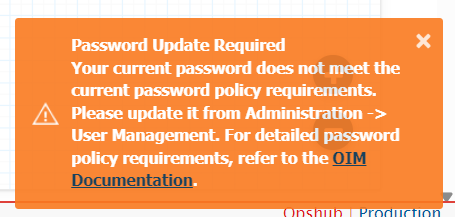
* Upon the first login post-upgrade, users with non-compliant passwords will see a security warning as shown below:
* These users must update their passwords via the [User Management](https://docs.opshub.com/manage/administrator/user-management) screen to meet the new complexity requirements.
* For Admin API Usage:
* Ensure all passwords passed through API calls are updated to meet the new criteria, as the API will strictly reject non-compliant strings. API calls will fail if the password does not meet the new requirements.
* **New Password Complexity Requirements:**
* **Minimum Length:** 10 characters.
* **Complexity:** Must include at least **three** of the following:
* Uppercase letters (A–Z)
* Lowercase letters (a–z)
* Numbers (0–9)
* Special characters (!@#$%^&\*)
* Any existing custom password policy set in space.vars.SITENAME will be replaced with new standard rules to ensure compliance. If you had custom settings earlier, a backup has been created for your reference at: `<>\AppData\logs\PasswordPolicy_Regex_And_RegexMessage_2026-03-19_13-32-44.txt`
**Reason**
* To strengthen product security and align with modern enterprise standards, space.vars.SITENAME has transitioned to a mandatory minimum password policy. This prevents the use of weak or default credentials that are vulnerable to automated attacks.